1. Project Overview
| Dimension | Information |
|---|---|
| Project name | QM |
| Warehouse | yc-software/qm |
| Official website | qm.ycombinator.com |
| Project Description | Multiplayer agent harness for work |
| official website positioning | Open-source agent harness from YC; Give each employee and project a OpenClaw-like agent |
| Open Source Protocol | MIT |
| Main Language | TypeScript |
| npm package | @ yc-software/qm |
| Latest npm / GitHub release | v0.1.4,2026-07-31 Released |
| GitHub Data | 2026-08-05 Check: Approximately 11k stars, 1.2k forks, 110 open issues |
| Run Stack | Node 24, Fastify, Postgres, Slack Bolt, Vite, Lit, Docker/Fly/AWS |
| Support harness | Pi, OpenCode, Codex, Claude Code |
The explanation of QM on the official website is very direct: YC has tried various agent harness internally, including the early Ruby agent loop, and later 50 Hermes agents for employees. As the number of agents increased, managing these personal assistants became more complex, so YC wanted an agent harness that was more suitable for startup/organizations, self-hosted and open source. QM is an open source result in this direction.
My understanding: QM solves not "whether there is a AI assistant", but "how to deploy, isolate, authorize, audit and expand the agent after everyone, every project and every Slack channel in the organization starts to use it".
2. Official Product Form
Screenshots of the Web UI are shown in the official README:
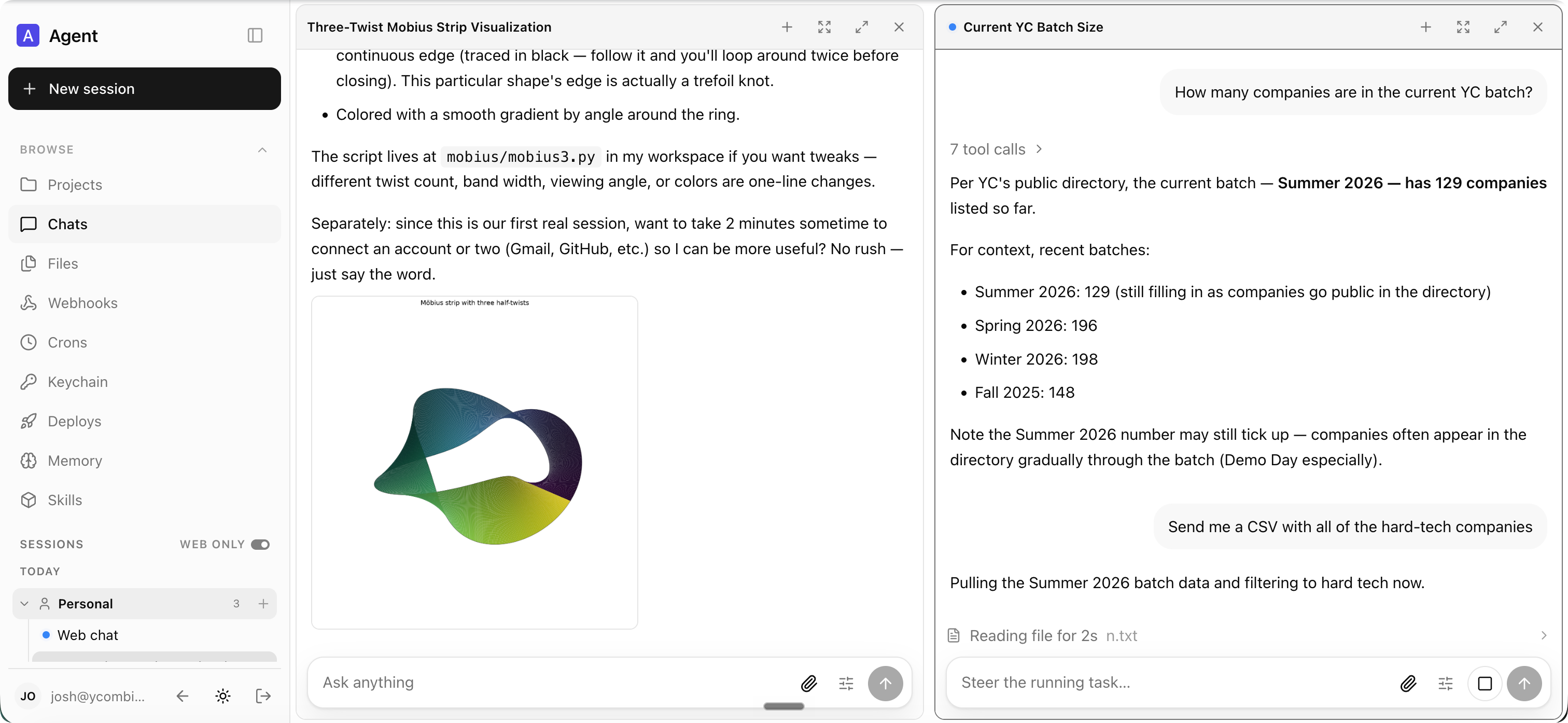
From the screenshots and README description, there are two main product portals for QM:
-Slack: Employees can collaborate with agents in Slack channel, group message, and project spaces.
-Web: The same identity and configuration can be carried over to the Web UI, and users can manage files, crons, keychain, deploys, memory, skills, etc.
This is important for pre-sales: instead of starting a new business from the day-to-day collaboration tools, QM uses Slack as a natural entry point, while retaining web management and a richer interface.
3. What can it mainly do
3.1 an independent Agentscope for each person and each collaboration space
The core concept of QM is scope. Everyone, every room/channel/project can have their own:
-memory
-files
-keychain view
-permissions
-crons
-web apps
-durable sandbox
This means that the Agent is no longer a company-wide "big robot", nor is it an isolated personal assistant on everyone's computer, but a work agent with organizational boundaries and collaborative boundaries.
Before the sale can say:
personal Agent solves "how can I do things faster" and QM solves "how can many people and many projects in the company work independently and collaborate in team space after they start using Agent".
3.2 Slack and Web Unified Identity and Provisioning
README explicitly states: same identity and configuration carries between Slack and the web app.
There are two values behind this:
-Users do not need to maintain two Agent configurations in Slack and Web systems.
-Administrators have unified control over available models, harness, security posture, and connectors at the organization level.
Suitable for customer conversations:
employees can start using Agent from Slack's low threshold, and then enter the Web UI for complex tasks. However, identity, permissions, memory and configuration are one set.
3.3 Administrator control model, harness, security posture
QM supports organization level configuration:
-Available harness:Pi, OpenCode, Codex, Claude Code.
-Available models: Anthropic, OpenAI, OpenRouter, etc.
-Security posture.
-Which models and harness can be used by employees.
-connector and keychain management.
There is also a change in the latest release v0.1.4 to restrict the Web UI model picker to select only the organization allowed-models list. This shows that the project is already complementing its capacity in the direction of "organizational governance.
3.4 Durable sandbox: Each scope has its own "persistent computer"
The README says that the agent has a very small toolsurface, and one of the tools is' execute', which executes commands in the scope's own isolated sandbox. This sandbox is durable computer, and installed tools will remain.
This is very close to the capabilities that enterprises really need when using agents:
-Separate file system for each employee or project.
-Can install exclusive tools.
-Work status can be retained.
-Can run scripts, tests, deploy commands.
-Can be combined with keychain/connector to access external systems.
But it's also the part with the biggest security risks. It enables the agent to have real execution capabilities, so we must pay attention to command approval, voucher isolation, audit and sandbox egress.
3.5 Web Apps: Build and publish internal apps
One of the capabilities listed in the README is Web apps:
-Spin up custom internal apps.
-Publish them to the right people.
-Keep their data current.
In other words, QM is not just a question and answer assistant, but also hopes that the agent can help the company generate internal tools, such:
-Data Kanban
-Operation background widget
-Project Status Page
-Internal query page
-Customer Data Summary Page
This is very valuable for startup, because startups often lack enough engineering resources to develop internal tools.
3.6 Shared skills: Organizational Skills Precipitation
QM supports shared skills:
-skills can be attributed to scope.
It can be shared via grant.
-admin-gated promotion is required to be promoted to the entire organization.
-Can import skill packs from git repositories.
Pre-sales value:
The high-value Agent operation process precipitated by an employee or project can be extended to the entire company after being reviewed by the administrator, rather than scattered in personal prompts.
3.7 Background work:crons and watches
QM supports crons and watches, allowing agents to work when no one is watching.
Typical scenario:
-Organize mailboxes regularly and generate draft replies.
-Check project progress daily.
-Timing query database and generate reports.
-Monitor CI, system logs, customer feedback.
-Monitor document or warehouse changes and alert the team.
This type of background agent is a key capability for upgrading from "chat assistant" to "semi-automatic employee.
4. Typical business scenario
4.1 Startup internal AI work assistant platform
QM's website explicitly says it's designed for startups. Startups tend to have several characteristics:
-Less people do more.
-Incomplete internal tools.
-A lot of information is scattered in Slack, Google Docs, mailboxes, databases, GitHub.
-Employees are willing to try AI automation.
-High acceptance of self-hosting, fast iteration and customization capabilities.
QM can become an internal agent platform, allowing each employee to have their own agent while collaborating in a shared project space.
4.2 Company Knowledge Retrieval and "company brain"
Capabilities listed in the README include:
-Search internal notes, email, documents, databases, and the web together.
-Retrieve information from your company brain.
Suitable scenarios:
-The new employee asked, "Why did a customer lose before?"
-Sales asked "What are our cases in this industry?"
-The product asks "Where are the pain points mentioned in the last user interview?"
-Founder asks "How are key accounts going this week?"
The difference of QM is not just RAG, but it can combine memory, files, connectors, scheduled work and sandbox execution to connect retrieval and action.
4.3 Mailbox and Personal Workflow Assistant
There is a typical example in README:
-Learn your writing voice from past ends.
-Triage your inbox on a schedule.
-Include labels and reply drafts.
This corresponds to a scenario that is very easy to impress customers: the agent learns a personal writing style, regularly processes emails, gives labels and drafts, but does not necessarily send them automatically.
Pre-sales demo can be designed:
- Connect the mailbox.
- Import past emails as style reference.
- Set up cron to handle new mail every morning.
- Agent output priority, classification and reply draft.
- Send after human confirmation.
4.4 R & D Collaboration and Code Warehouse Tasks
README explicitly writes that you can:
-Work in an existing repository.
-Run tests.
-Open PRs.
-Monitor CI.
-Check system logs.
Suitable for R & D team:
-Let the Agent fix the bug in the existing repo.
-Agent auto-run test.
-Agent monitors CI failures and suggests fixes.
-Agent checks logs and correlates to code changes.
-Agent reports regularly on the progress of the project Slack channel.
Compared to a single IDE Agent, the value of QM is that the organizational layer is deployable, auditable, and shareable.
4.5 internal application generation and maintenance
QM enables agents to create web apps and publish them to the right people. Suitable for:
-Make temporary tools for the operations team.
-Make customer status page for sales.
-Make FAQ/work order aggregation tool for support team.
-Do indicator board for management.
If the customer is discussing "using AI to quickly generate internal tools", QM can be used as a reference for a more cutting-edge open-source solution.
4.6 Multi-Agent/Multi-Harness Management
QM supports different harness such as Pi, OpenCode, Codex, and Claude Code to connect to the same core.
This is suitable for customers who want to avoid single vendor binding:
-Can choose different models and harness.
-Can switch the underlying Agent technology.
-Unified management of deployment and permissions at the organization layer.
Presentation:
QM is not betting on an Agent, but trying to be the control plane of Agent harness. The bottom layer can be changed, and the scope, memory, permissions, and audit of the organization are retained as much as possible.
5. Not suitable for the scene
| Scene | Why not |
|---|---|
| Mature large enterprises directly produce and land | The project is very early, GitHub release is only v0.1.4, and there are deployment problems in open issues |
| Public network multi-tenant SaaS | SECURITY clearly says that QM is not a hardened public or multi-tenant service boundary |
| Low-tech teams are ready to use. | Deployment involves Node, Docker, Fly/AWS, Postgres, Slack/OIDC, model key, sandbox, etc. |
| High Compliance and Strong Audit Scenarios | Although there are audits and permission designs, the security documents list a large number of known restrictions that require special audits. |
| As long as a Slack bot | The complexity of QM is much higher than that of ordinary Slack bots, which is suitable for organization-level Agent platforms instead of simple Q & A robots |
| An organization that does not allow agents to execute commands | QM's durable sandbox and execute capabilities are one of its core values. If it is completely prohibited, the value will drop. |
| Customers who do not accept self-hosted operation and maintenance | Each deployment runs on operator own cloud account, which requires operation and maintenance and cost bearing |
6. Core Competence List
| Capacity | Official Status/Basis | Pre-Sales Value | |
|---|---|---|---|
| Personal scopes | README | Each employee has a personalized agent, which does not affect each other | |
| Shared scopes | README | Slack channel / project can work together | |
| Slack Plugin | README, CLI Documentation | Low Friction into Enterprise Daily Collaboration Scenarios | |
| Web UI | README | Screenshots | Provides a more complete management and operation interface than Slack |
| Admin control | README | Manage models, harness, security policies, and organization configurations | |
| Durable sandbox | README, security | Agent has a sustainable working environment, can run commands and keep tools | |
| Keychain view | README | Credentials are managed by scope for easy connection to external systems | |
| Crons / watches | README | Support for background automation and scheduled tasks | |
| Web apps | README | Agent can generate internal applications and publish to specified people | |
| Shared skills | README | Precipitates experience into reusable skills and can be promoted at the organizational level | |
| Deployment CLI | CLI README | Manage Docker, Fly, and AWS deployments with standardized deployment directories | |
| Security posture | README, SECURITY | Provides three security modes: Strict, Auto, and Dangerous | |
| Audit | SECURITY | Trackable records of sensitive behavior to support post-mortem investigations |
7. Architecture and Deployment
7.1 Official Structure
The architecture diagram in README is as follows:
sessions · memory · queue")] subgraph CORE["Headless core"] API["API · identity · policy · scheduler"] LOOP["Agent loop
(Pi, OpenCode, Claude Code)"] API <--> LOOP end SBX["Per-scope sandbox
files · tools · logged-in services"] DB <--> API LOOP <--> SBX
Open to see, there are several layers:
-Headless core:API, identity, policy, scheduler.
-Agent loop: Call harness such as Pi, OpenCode, Claude Code, and Codex.
-Postgres: Save session, memory, queue, user data, and persistent state.
-Per-scope sandbox: files, tools, login services for each scope.
-Plugins:Web UI, Admin, Portal, Slack, etc. can be used as plug-ins on the core API.
7.2 Technology Stack
| Layers | Technology |
|---|---|
| Core | TypeScript on Node |
| HTTP | Fastify |
| Slack | Slack Bolt |
| Web UI | Vite Lit |
| Persistence | Postgres |
| Deployment | '@yc-software/qm' CLI |
| Local/Cloud Target | Docker, Fly.io, AWS |
| AWS Agent Computer | ECS Fargate Lambda MicroVM agent computers |
| Fly Agent Computer | Fly Machines |
7.3 Deployment Model
QM uses a very characteristic "deployment directory contract":
qm.config.jsonc
package.json
package-lock.json
deployment.md
.codex/skills/deploy-qm/
.env.example
.env
slack-app-manifest.yml
slack-sso-manifest.yml
sandbox/
  tools//tool.json
  tools//
  skills//SKILL.md
  Dockerfile
plugins//Dockerfile
infra/
Key points:
-'qm.config.jsonc' can be submitted without a secret.
-'.env' not committed, for local secret values.
-'package.json' pin lives the exact '@ yc-software/qm' version that generates the deployment directory.
-'qm check' static validation configuration, secret names, tools, skills, plugins.
-'qm doctor' read-only checks the external environment.
-'qm plan' renders the deployment plan.
-'qm up -- yes' performs the deployment.
-'qm check -- live' check line drift.
The significance of this method for pre-sales is that QM is not an application of "clone repo and then magic change", but hopes that each organization has a deployment directory that can be submitted, audited and repeatable.
7.4 Supported Deployment Targets
| Target | Positioning |
|---|---|
| Docker | Local quick test drive, not recommended for real deployment. |
| Fly.io | The official deployment runbook recommends that Fly is preferred when there is no preference, which is suitable for startup rapid deployment. |
| AWS | More enterprise-oriented cloud account deployment, involving ECS, ECR, RDS, ALB, Cloud Map, Secrets Manager, Lambda MicroVM, and more |
How to use #8.
8.1 Initialize Organization Deployment
Official README recommendation:
npm exec --yes --package=@yc-software/qm@latest -- \
  qm init . --org  --target
npm install
The complete process in the CLI documentation:
npm exec --yes --package=@yc-software/qm@latest -- \
  qm init . --org acme --target aws
npm install
npm exec qm -- check
npm exec qm -- infra render
npm exec qm -- doctor
npm exec qm -- infra build-image
npm exec qm -- plan
npm exec qm -- up --yes
npm exec qm -- check --live
8.2 Select model provider
The deployment runbook mentions optional:
-Anthropic
-OpenAI
-OpenRouter
'-- model-provider' can be set:
--model-provider anthropic
--model-provider openai
--model-provider openrouter
Corresponding key:
ANTHROPIC_API_KEY=...
OPENAI_API_KEY=...
OPENROUTER_API_KEY=...
8.3 select login method
The deployment documentation mentions several types of logins:
-Built-in'auth' broker: Login via mail one-time link, requires Resend or SMTP.
-Slack sign-in: Suitable for teams already running on Slack.
-External OIDC provider: for example Google Workspace.
-Playground mode: public trial deployment, but it must be a standalone deployment and cannot be opened on a real organization instance.
Configure Slack bot 8.4
If Slack bot is enabled:
- 'qm init' or 'qm slack render' generates a Slack manifest.
- Create a Slack app.
- Configure bot token and app token.
- Invite the bot to the test channel.
- @ mention the bot and verify the reply.
8.5 custom organization instance
QM supports two modes:
- Create only organization-owned deployment repository, depending on the '@ yc-software/qm' package.
- Use private fork to put the organization-specific configuration to' deploy/layers/
/', and the core code is consistent with the upstream.
Official special reminder: don't use GitHub Fork button to do private fork, because public repo's GitHub fork cannot become truly private, and object network sharing will bring SHA accessibility problems. A separate private repo should be created in the same way as bare clone mirror push.
9. Security model and risk boundary
QM's SECURITY.md is very realistic, and it is recommended to present it as both advantages and risks before sales.
9.1 Three safety posture
| Posture | Meaning |
|---|---|
| Strict | Every harness tool call is paused for manual approval, except for turn ender with no side effects |
| Auto | Default mode; use classifier to screen external data and tool results with provenance |
| Dangerous | No content screening, no pause between tool calls |
Note: Even if the mode is Dangerous, the hard deny rules in the pre-declared command policy still take effect, such as recursive deletion and destructive SQL.
9.2 official clear restrictions
There are many key restrictions in SECURITY.md that must be known before sales:
-QM is an early experimental software, not a substitute for security certification or deployment security review.
-The current interactive agent surface assumes an authenticated internal user of an organization.
-QM is not a hardened public or multi-tenant service boundary.
-The Command policy is a speed bump, not a sandbox boundary, and can be bypassed by obfuscation, coding, and script execution.
-Browser actions some do not re-enter the command policy or human approval.
-The Sandbox credentials is plaintext when used and can be read by processes in the sandbox.
-Credential purpose are not mandatory; once the credentials are materialized, the purpose text cannot restrict how the compromised process can use them.
-Auto security screening is heuristic and incomplete.
-The Egress enforcement is conditional, deployment-runtime the egress enforcement has not yet been built.
-Admin can read sensitive content, read will audit, but not separate consent-gated.
-Durable data may be retained longer than the user expects, artifact the expiry/byte reclamation has not yet been implemented.
-Published-app capability links is a bear authorization.
Pre-Sales Interpretation:
QM does not impress customers by promoting "absolute security", but rather honestly writes clearly the risk boundaries when the Agent executes commands, accesses credentials, and processes external input. This is a good thing for PoC; for production landing, security review and deployment governance must be done.
Three Types of Things 9.3 Agents Can't Do by themselves
Officials deliberately limit the three types of operations to portal instead of Agent self-API:
-Admin grant changes.
-Impersonation.
-Command-approval decisions.
The reason is that these operations will authorize the future behavior of the Agent. If the Agent can change it, the human-in-the-loop and permission boundary will be broken.
This is a good customer communication point:
There is a principle in QM's security design: all decisions that will authorize future Agent behavior must come from humans/portal outside the Agent, instead of letting the Agent approve itself.
10. What can I say before sales
10.1 a sentence positioning
QM is an open source, organization-level agent workbench that allows each employee, channel, and project to have their own isolated agent scope and use it in real workflows via Slack and the Web.
10.2 for CTO/Founder
Nowadays, many companies have moved from "personal AI to write code/email" to "many people and projects in the organization need Agent. The value of QM is to turn these agents into a manageable infrastructure: unified deployment, unified model selection, unified permissions, security posture, auditing, and shared skills.
10.3 Oriented R & D Effectiveness Leader
QM allows Agent to enter the existing warehouse and Slack project channel, perform tests, open PR, monitor CI, check logs, and deposit the process in the team collaboration space. It's more like an Agent control plane, not just a personal assistant in an IDE.
10.4 for IT/Platform Engineering
The deployment of QM is not a SaaS black box, but runs in operator own cloud account. It standardizes configuration, sandbox, plugins, infra, and secrets routing through deployment directory, and supports Docker/Fly/AWS. Different environments can be check, doctor, plan, up, and live check.
10.5 for security responsible person
QM provides Strict/Auto/Dangerous three types of security posture, command approval rules, scope isolation and audit, while the security document clearly lists the boundaries of non-commitment. It is suitable for controlled PoC, but special evaluation needs to be done around sandbox, vouchers, egress, data retention and administrator rights before production.
11. Comparison with adjacent schemes
| Categories | Represents | Differences in QM |
|---|---|---|
| Personal AI coding tools | Codex, Claude Code, Cursor, and OpenCode | Instead of replacing a single coding agent, QM connects multiple harness to the organization-level scope, Slack/Web, sandbox, admin, and audit |
| Slack bot | Self-built bot, ChatGPT Slack bot | QM is heavier, with persistent sandbox, memory, crons, skills, web apps and deployment contract |
| Agent Framework | LangGraph, AutoGen, CrewAI | Those that prefer orchestration framework, QM prefer organization workspace and deployment control plane |
| Enterprise RAG/Knowledge Base | Dify, AnythingLLM, Glean Classes | QM not only retrieves, but also executes, times, connects tools, and generates internal applications |
| Internal tool platform | Retool, ToolJet, Base44 | QM emphasizes the generation and maintenance of tools by agents, but the maturity and low code visualization capabilities cannot be equated with mature platforms |
| Enterprise Collaboration Platform | Slack, Teams, Flying Book | QM attaches/integrates Slack instead of a complete alternative collaboration platform |
12. PoC Recommendations
12.1 PoC Target
Do not set the PoC goal as "replacing Slack" or "enterprise-class Agent platform online". It is recommended to set it:
Verify that QM can extend personal Agent capabilities to organizational collaboration scenarios and meet the pilot needs of a small team in scope isolation, security posture, background tasks, Slack/Web portals, and auditing.
12.2 PoC Scenario 1: Employee Personal Work Assistant
Process:
- Select 3-5 internal pilot users.
- Each person creates an independent scope.
- Configure basic memory, files, and keychain.
- Connect a mailbox or document system.
- Set up an inbox triage or daily summary cron.
- Verify that the Agent can generate usable summaries and draft responses.
Evaluation indicators:
| Metrics | Concerns | |||||||||||||||||||||||||||||||||||||||||||||||||||||||||||||||||||||||||||||||||||||||||||
|---|---|---|---|---|---|---|---|---|---|---|---|---|---|---|---|---|---|---|---|---|---|---|---|---|---|---|---|---|---|---|---|---|---|---|---|---|---|---|---|---|---|---|---|---|---|---|---|---|---|---|---|---|---|---|---|---|---|---|---|---|---|---|---|---|---|---|---|---|---|---|---|---|---|---|---|---|---|---|---|---|---|---|---|---|---|---|---|---|---|---|---|---|
| Accuracy | Whether message classifications, summaries, drafts are available | |||||||||||||||||||||||||||||||||||||||||||||||||||||||||||||||||||||||||||||||||||||||||||
| Security | Whether to avoid unauthorized reading of other people's scope | |||||||||||||||||||||||||||||||||||||||||||||||||||||||||||||||||||||||||||||||||||||||||||
| Audit | Can administrators track key actions |
12.3 PoC Scenario 2: R & D Project Channel Agent
Process:
- Select a non-core repo.
- Connect to the QM bot in the Slack project channel.
- Let Agent pull repo, run test and analyze CI failure.
- Let the Agent create a small PR or fix suggestion.
- Observe the approval experience using the Strict or Auto posture.
Evaluation indicators:
-Whether the Agent can stably run engineering commands in the sandbox.
-Whether the test and PR process is controllable.
-Whether the order approval can be accepted by R & D.
-Whether the failure can locate the cause.
-Whether the credentials are only exposed in the authorization scope.
12.4 PoC Scenario 3: Internal Application Generation
Process:
- Select a lightweight internal requirement, such as a customer follow-up kanban.
- Provide data source and requirement description for Agent.
- Let the Agent create a Web app.
- Release to a designated crowd.
- Verify permissions, data updates, access links, and maintenance experiences.
Evaluation indicators:
-How long it takes to go from demand to accessible applications.
-Whether the published object is controllable.
-Whether the data connection and refresh are reliable.
-App capability whether the link risk is acceptable.
12.5 PoC Success Criteria
| Dimension | Success Criteria |
|---|---|
| Business Value | At least one real workflow saves significant labor time |
| User Experience | Users Willing to Continue in Slack/Web |
| safe and controllable | scope isolation, approval and voucher management meet the pilot requirements |
| Operation and Maintenance Controllable | The platform team can deploy, upgrade, view logs, and roll back |
| Scalability | Can scale from a single player to a project channel or small team |
13. Frequently Asked Customer Questions
| Customer Questions | Suggested Answers |
|---|---|
| Is QM an official YC project? | The official website is located at 'qm.ycombinator.com '. The copywriter claims that it is a YC open-source agent harness with the code in yc-software/qm'. Presales are still recommended to be presented as open source projects rather than commercial SaaS commitments. |
| What is its relationship with OpenClaw/Hermes? | The official website said QM came from YC's experience of running 50 Hermes agents, hoping to give employees and projects a OpenClaw-like agent. It is not simply a copy of a harness, but rather an organizational hierarchy. |
| Can it be used directly in production? | Direct use in critical production is not recommended. Project v0.1.4, very early, security documentation also emphasizes experimental, requiring PoC, security audits, and limited scope pilots. |
| Support Slack? | Support. Slack is an optional in-process plugin, and the deployment documentation contains Slack bots and Slack sign-in routes. |
| Do I have to use a model? | No. provider such as Anthropic, OpenAI, and OpenRouter are supported. harness such as Pi, OpenCode, Codex, and Claude Code are also supported. |
| Where is the data deployed? | Each deployment runs in operator own Alibaba Cloud account and supports Docker, Fly, and AWS. You Postgres store persistent data such as session, memory, and queues. |
| What about security? | Scope isolation, permissions, auditing, Strict/Auto/Dangerous posture, and command policies. However, the security documentation lists many restrictions and cannot be considered a certified security boundary. |
| Can I use it as an internal application? | README states that it supports spin up custom internal apps and publishing them to the appropriate people, but needs to verify maturity and permission control in PoC. |
| Can I connect to an enterprise system? | Can be extended through connectors, keychain, sandbox tools, skills, etc. However, specific systems require custom deployment layers and security assessment. |
14. Main Risks and Precautions
14.1 project is very early
Warehouse created in 2026-07-29, latest release v0.1.4. Although stars is growing fast, open issues has exceeded 100. Recently, issue includes basic problems such as deployment failure, Fly target, AWS mirror architecture, OIDC configuration synchronization, etc.
Pre-sales advice:
Introduce QM as a "cutting-edge open source project and PoC solution", not as a mature enterprise product commitment.
14.2 deployment complexity is not low
Real deployment involves:
-Node 24
-npm
-Docker Buildx
-Fly.io or AWS
-Postgres
-Slack app / OIDC / email broker
-Model provider key
-sandbox image
-secrets push
-live check
This requires the customer to have platform engineering capabilities.
14.3 security boundary needs special assessment
Key Focus Areas:
-Agent command execution is acceptable.
-sandbox how credentials are stored and rotated.
-whether scope isolation is sufficient.
-whether egress can actually be enforced.
-Data retention browser provider and model provider.
-admin content whether the read permission meets the compliance requirements.
-durable whether the data retention is controllable.
14.4 Slack integration with enterprise identity may get stuck
As noted in the deployment runbook, the email domain verification is one of the steps that can get stuck in the deployment. Slack sign-in can bypass the problem of sending mail domain names, but it needs to configure Slack SSO app, callback, token, etc.
Special 14.5 contribution mode
CONTRIBUTING.md indicates that the project prefers external contributors to submit human writed'. txt 'or'. md' proposals to' adrs/' instead of directly submitting code PR. Because the underlying code is mostly written by coding agents, maintainers want to align ideas before they consume tokens to implement them.
This shows that project practices are cutting-edge, but it also means that external community participation is different from normal open source projects.
15. Pre-sales Question List
15.1 to judge whether it is suitable for customers
-Are you using personal AI agents now?
-Do employees handle a lot of work in Slack?
-Do you want each employee/project to have its own Agent?
-Do I need the Agent to process emails, documents, project status, or CI on a scheduled basis?
-Would you like the Agent to run commands in an isolated sandbox?
-Is there platform engineering capability to deploy to Fly/AWS?
-Can early experimental projects be accepted for PoC?
15.2 judgment of safety and governance requirements
-What credentials can the Agent access?
-Which commands must be manually approved?
-Allow Agent to access browser or external network?
-Do all model requests need to be retained for auditing?
-Does Admin allow reading of user transcript and memory?
-What are the data retention periods and deletion requirements?
-Do I have to log in through Enterprise OIDC/SSO?
15.3 to judge the PoC range
-Start with personal assistants, project channels, or internal apps?
-Which systems need to be connected: Slack, GitHub, Gmail, Google Drive, database?
-Which model provider do I need to choose?
-Deploy on Fly or AWS?
-Do I need to enable the Strict posture?
-Is the success criterion saving time, reducing omissions, generating PR automatically, or going online with internal tools?
16. My Pre-Sales Judgment
QM is a project worthy of attention, because it captures the very real problem after the landing of AI Agent: when every employee, every project and every Slack channel starts to have Agent, what the organization needs is no longer more chat robots, but a working platform that can manage Agent identity, permissions, memory, sandbox, background tasks, skills, deployment and audit.
It is best suited as pre-sales material for the following scenarios:
-Tell the customer "how to upgrade the personal AI assistant to the organization level Agent platform".
-Help startup or innovation teams design Agent Workbench PoC.
-Compare the boundaries of Slack bot, personal coding agent, agent framework, and enterprise knowledge base.
-Discusses security governance when agents execute commands and access credentials.
-Show the open source direction that YC has precipitated after using 50 agents internally.
But it also has obvious limitations:
-Early version.
-Complex deployment.
-More security restrictions.
-Production reliability unknown.
-GitHub issues exposed a number of deployment and integration issues.
One word conclusion:
QM is very suitable for discussing the future form of "organization-level Agent infrastructure" with customers, especially for startup, R & D teams and platform engineering teams to do small-scale PoC; However, it should not be packaged into mature enterprise products at present, and it is not recommended to directly enter key production processes without safety assessment.
17. Quick Sales Summary
| Question | Answer |
|---|---|
| What is it? | YC open-source multiplayer agent workbench/organization-level agent harness |
| Core Value | Provides an isolated scope for employees, channels, and projects, allowing agents to manage, collaborate, and audit |
| Portal | Slack and Web |
| Who is suitable for | Startup, R & D team, AI innovation team, platform engineering team |
| What can I do | Knowledge retrieval, mailbox processing, code tasks, CI monitoring, background crons, internal applications, shared skills |
| Where to deploy it? | operator your own cloud account and support Docker, Fly, and AWS |
| Which models/harness are supported | Anthropic, OpenAI, OpenRouter;Pi, OpenCode, Codex, Claude Code |
| Maximum Risk | Early in the project, security perimeter and deployment stability require PoC verification |
| Pre-sales advice | As a leading-edge PoC/reference architecture, not as a mature enterprise platform commitment |