1. Project portfolio overview
What is the relationship between 55.00g items
| Project | Location | Role | Typical User |
|---|---|---|---|
| earendil-works/pi | Agent Harness / Coding Agent CLI / SDK | Provides multi-model calling, Agent Loop, tool calling, terminal TUI, session management, and extension mechanism | Developer, Agent engineering team, and AI tool builder |
| agegr/pi-web | Pi Coding Agent's local Web UI | reads Pi native session files, provides browser workbench, session browsing, real-time chat, model/skill configuration, project file preview | developers using Pi, people who need visual collaboration/reworking |
They can be understood:
-'pi' is "engine" and "terminal workbench".
-'pi-web' is the "browser console" and "session/project visualization layer".
-The two share the local configuration, model, skill, and session files of the Pi. The typical data directory is '~/.pi/agent/sessions'.
One detail needs to be paid attention to: the link in the' pi-web' README still saites' badlogic/pi-mono ', but its dependency and current project description both point to the' @ earendil-works/pi-* 'package; Judging from the current GitHub metadata and npm package, it is suggested to use earendil-works/pi' as the Pi main repository before sales.
1.2 Current Open Source Activity Signal
Inspection date: 2026-07-25. The following Stars, Forks, Release, and Last Submission Time are all from the GitHub API and are subject to change.
| Metrics | Pi | Pi Web |
|---|---|---|
| GitHub Repository | 'earendil-works/pi' | 'agegr/pi-web' |
| Description | AI agent toolkit: unified LLM API, agent loop, TUI, coding agent CLI | Web UI for the pi coding agent |
| Main Language | TypeScript | TypeScript |
| License | MIT | MIT |
| Stars | 77,428 | 2,711 |
| Forks | 9,528 | 359 |
| Open Issues | 78 | 30 |
| Latest Release | 'v0.82.1 ',2026-07-25 | 'v0.8.0',2026-07-22 |
| recently pressed | 2026-07-25 | 2026-07-25 |
| npm package | '@ earendil-works/pi-coding-agent@0.82.1' | '@ agegr/pi-web@0.8.0' |
| Node Requirement | '@ earendil-works/pi-coding-agent' Requires Node'>= 22.19.0 ' | package depends on Next.js 16 / React 19 and on Pi '0.81.1' series |
2. What does it mostly do?
2.1 Pi: Minimal core, strongly scalable Coding Agent
The official Pi documentation defines it as "minimal terminal coding harness". Instead of cramming all the capabilities into the core, it keeps a smaller core and then lets users scale by workflow through TypeScript Extensions, Skills, Prompt Templates, Themes, and Pi Packages.
The core components of the Pi:
| Package | Action |
|---|---|
| '@ earendil-works/pi-ai' | Unified multi-model LLM API, supporting multi-provider, authentication parsing, token/cost tracking, and cross-model context handoff |
| '@ earendil-works/pi-agent-core' | The stateful Agent runtime is responsible for tool invocation, event flow, Agent state management, parallel/sequential tool execution |
| '@ earendil-works/pi-coding-agent' | Interactive Coding Agent CLI with built-in tools such as 'read', 'write', 'edit', and 'bash' |
| '@ earendil-works/pi-tui' | Terminal UI components and differential rendering capabilities |
Pi defaults to four main types of tools for the model: 'read', 'write', 'edit', and 'bash '. In addition to that, it supports loading more abilities via Skills and Extensions. Its philosophy is very clear: no built-in MCP, no built-in sub-Agent, no built-in permission pop-up window, no built-in plan mode, no built-in todo, but let users realize it through extension, container, tmux, external package or their own workflow.
This will make the Pi more like a "programmable agent Harness" rather than a "one-stop-shop agent product".
Terminal interaction experience of 2.2 Pi
The screenshot of Pi's interactive mode is as follows:
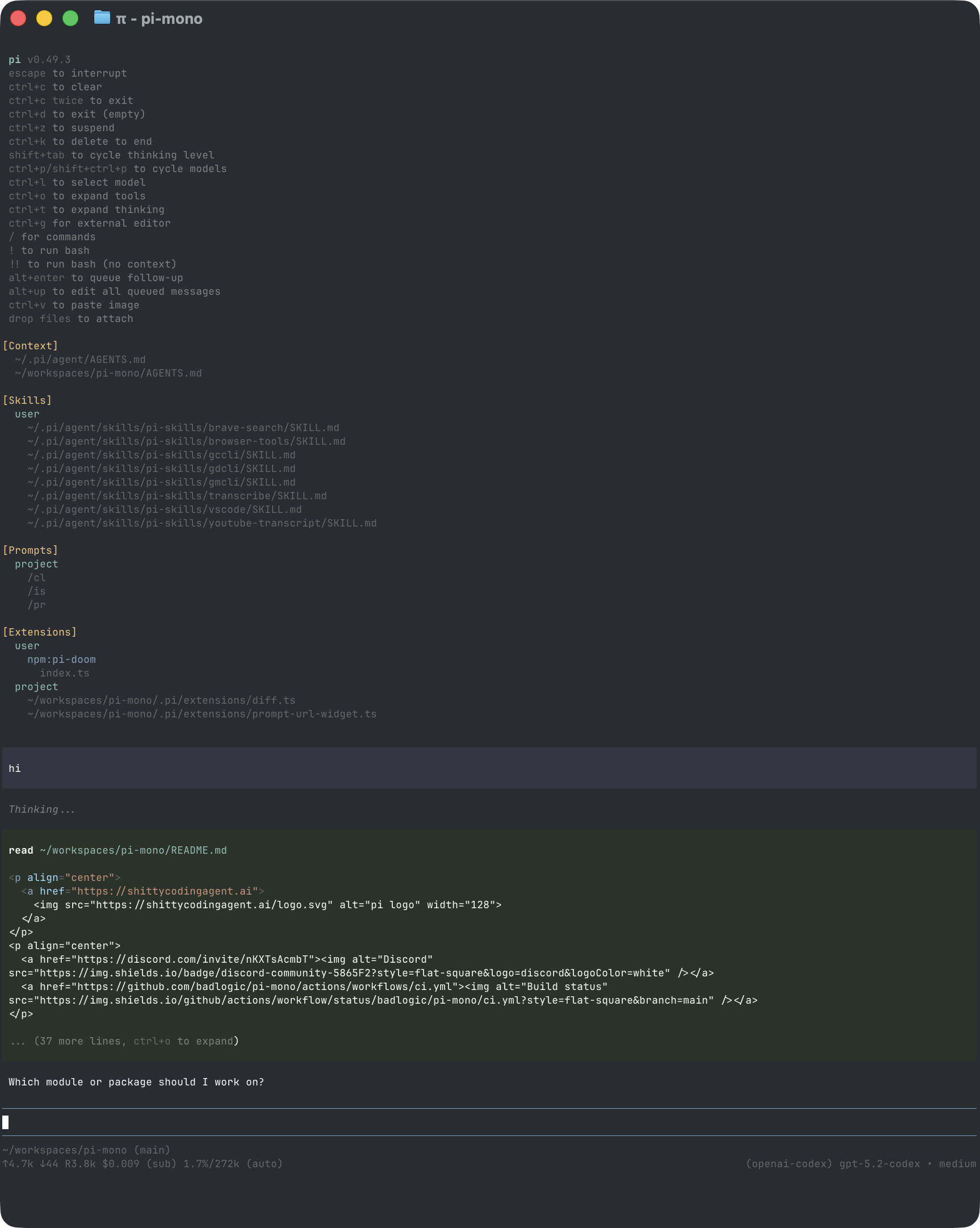
The TUI of the Pi contains a startup header, a message area, an input editor, and a bottom status bar. The bottom shows the working directory, session name, token/cache usage, cost, context usage, and current model. For developers, this is more suitable for long coding tasks than ordinary command-line chat.
It supports:
-'@' refers to the project file.
-Tab completion path.
-Shift Enter multi-line input.
-Ctrl G Open the external editor.
-Ctrl L Opens the model selector.
-'/model' switch model.
-'/resume' selects the historical session.
-'/tree' jumps in the session tree.
-'/compact' manually compress the context.
-'/share' share session.
-'pi -p' non-interactive one-time output.
-'pi -- mode json' Output JSON event stream.
-'pi -- mode rpc' does process integration via stdin/stdout JSONL.
2.3 Pi's session tree and branching capabilities
Pi sessions are saved in JSONL and support a tree structure with 'id' and 'parentId' for each entry '. Users can continue from the history node in the same session file and form branches. You can also fork to a new session file.
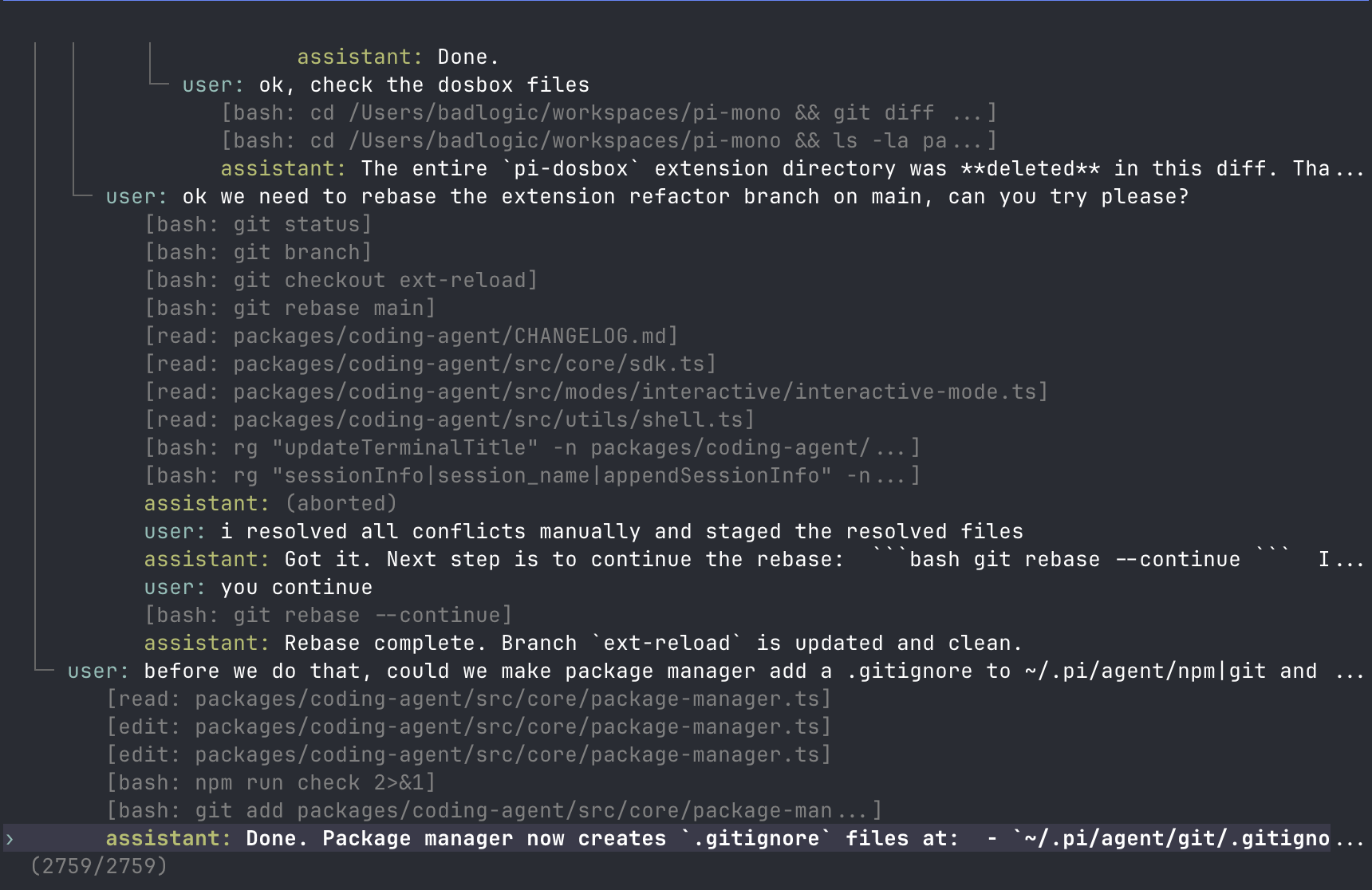
This is key for the Coding Agent: real development often requires trying another scenario from some point in the middle, rather than a simple linear chat. Pi's '/tree','/fork', '/clone' can turn "exploring different implementation paths" into first-class capabilities.
2.4 Pi's SDK / RPC Embedding Capability
Pi is not just CLI. It offers:
-SDK:Node.js applications can directly 'createAgentSession()'.
-RPC Mode: Non-Node.js applications can integrate with the JSONL protocol separated by LF via 'pi -- mode rpc.
-JSON Mode: One-time task outputs structured events.
-'@ earendil-works/pi-agent-core': independent agent runtime, which can be used for self-built applications.
-'@ earendil-works/pi-ai': Standalone multi-model call library that can be used for non-Pi Agent scenarios.
This makes the Pi suitable as the underlying library for an in-house Agent tool chain, not just an executable CLI.
2.5 Pi Web: Local Browser Workbench
Pi Web is the local Web UI for the Pi Coding Agent. It reads native Pi session files and provides session management, real-time dialog, model configuration, skill management, and project file preview.
The native key screenshots of the project are as follows:
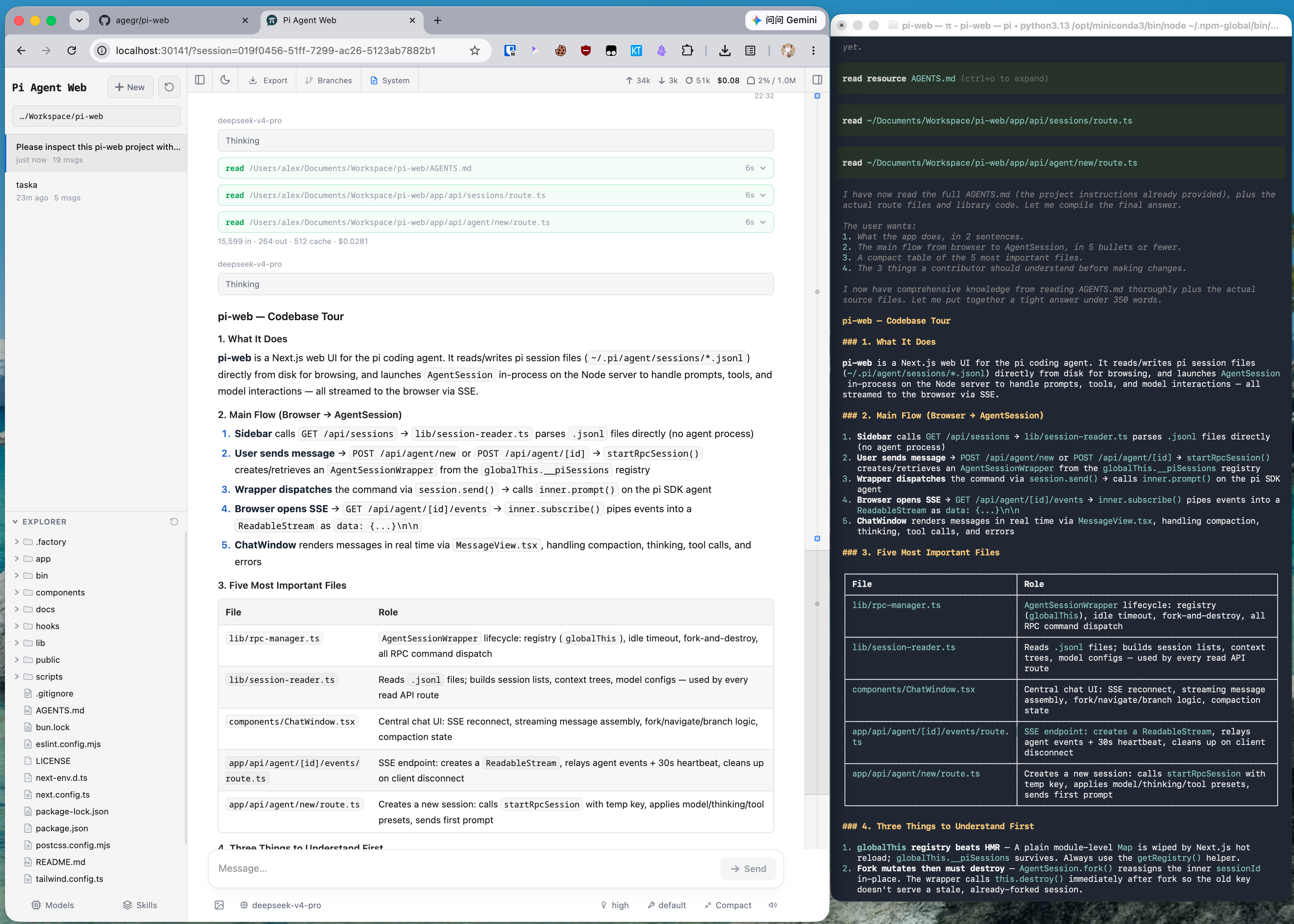
Pi Web solves the visual short board of pure CLI:
-Browse historical sessions by item without flipping '~/.pi/agent/sessions'.
-Continue from historical messages, fork conversations, explore different routes.
-Browse project files on the left and preview source code, Markdown, images, audio, PDF, docx on the right.
-View context usage, cost, compression status, system prompts.
-Manage models, login/API keys, model tests, and skill switches in the Web UI.
-Support Git worktree switching, so that new sessions and Explorer of different branches/checkout follow the selected workspace.
-Real-time communication with backend AgentSession via SSE.
3. Supported models and Provider
Pi's '@ earendil-works/pi-ai' supports a large number of provider. The official README explicitly lists include:
-OpenAI
-Azure OpenAI
-OpenAI Codex
-Anthropic
-Google Gemini
-Google Vertex AI
-DeepSeek
-NVIDIA NIM
-Mistral
-Groq
-Cerebras
-Cloudflare AI Gateway / Workers AI
-xAI
-OpenRouter
-Vercel AI Gateway
-ZAI Coding Plan
-MiniMax
-Together AI
-Hugging Face
-Moonshot AI / Kimi For Coding
-GitHub Copilot
-Amazon Bedrock
-Fireworks
-Xiaomi MiMo
-OpenAI-compatible APIs:Ollama, vLLM, LM Studio, etc.
Pi Coding Agent README also mentions that subscription class provider such as Anthropic Claude Pro/Max, OpenAI ChatGPT Plus/Pro(Codex), GitHub Copilot can be used via '/login'; API Key provider can also be used. For pre-sales, this point is very valuable: it allows customers to start with existing subscriptions or API keys, and can also interface with internal model gateways.
4. Applicable Scenario
Scenario 1: Local Coding Agent of R & D Team
Suitable for: R & D engineers, technical leaders, AI programming tool exploration team.
The advantages of Pi are lightweight, terminal native, session branching, model switching, and tool extensibility. It is suitable:
-Let the Agent read, modify, and search the code in the local project directory.
-Use '@ file' to reference key files and cooperate with' read/edit/bash' to complete the task.
-Use '/tree' to go back to a certain historical node and try different implementations.
-Manage long context with '/compact.
-Use Pi Web to duplicate sessions, view change files, preview documents and pictures.
Scenario 2: The underlying Harness of the Agent platform team
Suitable for: teams that are developing agent platforms, AI IDEs, code assistants, and internal automation tools.
Pi's 'pi-ai-agent' and 'pi-agent-core' can be used apart:
-'pi-ai' solves multi-provider unified call, authentication, event flow, token/cost, tool call compatibility.
-'pi-agent-core' resolves agent state, event flow, tool execution, hook, context transitions.
-The Coding Agent CLI is a complete reference implementation.
Before sales, it can be regarded as "Agent Runtime reference implementation under the TypeScript technology stack.
Scenario 3: Agent using team that needs to visualize session redisk
The value of Pi Web is to turn the Agent session in the terminal into a browsable, manageable, and reproducible workbench.
Suitable for:
-Developers who need to continue working from the history session.
-Engineers who want to compare multiple implementation routes.
-A person who wants to show the team how the Agent accomplishes a certain task.
-Users who want to put code, Markdown, pictures, PDF preview and Agent chat in one interface.
Scenario 4: Multi-model evaluation and Agent workflow experiment
Pi supports fast model cutting, model list refresh, cost/context visibility, session export, JSON/RPC mode, and is suitable:
-Comparison of the effects of different models on the same code task.
-Tool invocation strategy experiment.
-Prompt Template / Skills / Extensions experiments.
-Agent session data collection and duplication.
Scenario 5: Ecological Exploration of Internal Toolkit/Agent Package
Pi Packages can package extensions, skills, prompts and themes and share them through npm or git. Within the enterprise, it can be precipitated:
-Team coding specification package.
-On-premises deployment/release package.
-Security audit toolkit.
-Prompt Template specific to the project.
-Internal API tool extensions.
5. Not suitable for the scene
| Not suitable for the scene | Reason |
|---|---|
| Enterprise-class multi-user Web SaaS that wants to be used out of the box | Pi is a local/developer tool orientation, Pi Web is also a local UI, not a complete enterprise management background |
| Requires strong permission system, audit, organization management | Pi explicitly does not have a built-in permission system, and runs with startup user permission by default |
| Hope to have built-in MCP, sub-Agent, Plan Mode, Todo integrated products | Pi's philosophy is to keep the core small, and these capabilities should be realized through expansion or external tools |
| Direct use by non-technical users | The main entrance and concept of Pi are still partial to developers |
| Sensitive to API Key exposed on the front end and no back-end proxy | The pi-ai document clearly reminds browsers of the risks of directly exposing API Key |
| Requires cloud collaboration, multi-user shared sessions | Pi Web reads local files, more suitable for personal or local use, not collaborative SaaS |
6. Core Competence List
6.1 Pi Capability Matrix
| Capabilities | Descriptions | Pre-Sales Value | ||||||||||||||||||||||||||||||||||||||||||||||||||||||||||||||||||||||||||||||||||||||||||||||||||||||||||||||||||||||||||
|---|---|---|---|---|---|---|---|---|---|---|---|---|---|---|---|---|---|---|---|---|---|---|---|---|---|---|---|---|---|---|---|---|---|---|---|---|---|---|---|---|---|---|---|---|---|---|---|---|---|---|---|---|---|---|---|---|---|---|---|---|---|---|---|---|---|---|---|---|---|---|---|---|---|---|---|---|---|---|---|---|---|---|---|---|---|---|---|---|---|---|---|---|---|---|---|---|---|---|---|---|---|---|---|---|---|---|---|---|---|---|---|---|---|---|---|---|---|---|---|---|---|---|---|---|
| Multi-Provider LLM API | 'pi-ai unifies OpenAI, Anthropic, Google, Bedrock, OpenRouter, and more | Reduces model switching costs for customer multi-model strategies | ||||||||||||||||||||||||||||||||||||||||||||||||||||||||||||||||||||||||||||||||||||||||||||||||||||||||||||||||||||||||||
| Agent runtime | 'pi-agent-core' supports status, tool calls, and event streams | Can be embedded in self-developed Agent applications | ||||||||||||||||||||||||||||||||||||||||||||||||||||||||||||||||||||||||||||||||||||||||||||||||||||||||||||||||||||||||||
| Coding Agent CLI | 'pi' command line interaction, built-in read/write/edit/bash | Developers can directly use real projects | ||||||||||||||||||||||||||||||||||||||||||||||||||||||||||||||||||||||||||||||||||||||||||||||||||||||||||||||||||||||||||
| TUI | Differential rendering, status bar, shortcut keys, model selection | Long encoding experience is better than plain text | ||||||||||||||||||||||||||||||||||||||||||||||||||||||||||||||||||||||||||||||||||||||||||||||||||||||||||||||||||||||||||
| Session tree | JSONL session, branch/fork/clone | Suitable for exploring multiple implementation routes | ||||||||||||||||||||||||||||||||||||||||||||||||||||||||||||||||||||||||||||||||||||||||||||||||||||||||||||||||||||||||||
| Context compaction | Support manual/automatic compression | Suitable for long tasks and long code sessions | ||||||||||||||||||||||||||||||||||||||||||||||||||||||||||||||||||||||||||||||||||||||||||||||||||||||||||||||||||||||||||
| Skills | Supports Agent Skills standard | Precipitates reusable processes | ||||||||||||||||||||||||||||||||||||||||||||||||||||||||||||||||||||||||||||||||||||||||||||||||||||||||||||||||||||||||||
| Extensions | TypeScript extension tools, commands, events, UI | Enterprise customizable to internal processes | ||||||||||||||||||||||||||||||||||||||||||||||||||||||||||||||||||||||||||||||||||||||||||||||||||||||||||||||||||||||||||
| Prompt Templates | Markdown template slash command call | Unified team prompt | ||||||||||||||||||||||||||||||||||||||||||||||||||||||||||||||||||||||||||||||||||||||||||||||||||||||||||||||||||||||||||
| SDK/RPC/JSON | Can embed Node or other processes | Can integrate with existing platforms | ||||||||||||||||||||||||||||||||||||||||||||||||||||||||||||||||||||||||||||||||||||||||||||||||||||||||||||||||||||||||||
| Containerization | Gondolin, Docker, OpenShell | Security isolation can be selected by scene |
6.2 Pi Web Capability Matrix
| Capabilities | Descriptions | Pre-Sales Value |
|---|---|---|
| Local Web UI | 'npx @ agegr/pi-web @ latest' startup | Lowering the CLI-only threshold |
| Session Browsing | Read '~/.pi/agent/sessions' by item' | Easy to review history |
| Real-time chat | Backend creation/drive AgentSession, feedback events through SSE | Continue to use Pi on the web |
| File Explorer | Browse project files, preview source code, documents, pictures, audio, PDF, docx | Agent working process is more visible |
| Model configuration | Manage models.json, API Key, and model test | Reduce the burden of terminal configuration |
| Skills Management | Skills List, Search, Install, Start and Stop | Easier Operations Skills |
| Worktree support | Switch between Git worktree, new sessions follow checkout | Suitable for multi-branch parallel development |
| Fork / Edit from here | New session file or same file branch | Support exploring multiple routes |
| Context/cost visible | context, cost, compaction, system prompt at the top | Helps manage consumption |
7. Architecture, Deployment and Integration
7.1 logical architecture
7.2 deployment method
Pi:
npm install -g --ignore-scripts @earendil-works/pi-coding-agent
pi
Linux/macOS installer:
curl -fsSL https://pi.dev/install.sh | shPi Web:
npx @agegr/pi-web@latestor global installation:
npm install -g @agegr/pi-web
pi-web
Open by default:
http://localhost:30141Common parameters:
pi-web --port 8080
pi-web --hostname 127.0.0.1
pi-web --no-open

PORT=8080 pi-web
PI_WEB_NO_OPEN=1 pi-web
7.3 safety isolation method
The Pi README explicitly states that the Pi does not include a built-in permission system to restrict file system, process, network, or credential access; it runs by default with the privileges of the user and process that started it. If you need stronger boundaries, be containerized or sandboxed.
The official containerization document gives three modes:
| Mode | Isolate objects | Fit scene | Attention points |
|---|---|---|---|
| Gondolin extension | Built-in tools and '! 'Command | I want Pi and provider auth to stay on the host, but the tool is executed in the local Linux micro-VM | The Extensions itself is still running in the environment where the Pi process is located |
| Plain Docker | The entire Pi process | Simple local isolation | Provider API Key enters the container |
| OpenShell | The entire Pi process | Requires file, process, network, credential, inference routing policy control | Requires OpenShell gateway |
Before selling, make it clear that Pi's "no built-in permission pop-up window" is a product philosophy, not a defect itself. However, enterprises must land through containers, sandboxes or extended permissions boundaries.
How to use #8.
8.1 Pi Quick Getting started
npm install -g --ignore-scripts @earendil-works/pi-coding-agent
export ANTHROPIC_API_KEY=sk-ant-...
pi
You can also use it after starting:
/loginSelect Use Subscription or API Key after provider.
Common commands:
/model       切换模型
/resume      选择历史会话
/new         新会话
/tree        在当前会话树里跳转
/fork        从历史消息创建新会话
/compact     压缩上下文
/settings    修改设置
/share       分享会话
/export      导出 HTML 或 JSONL
/reload      重新加载扩展、技能、提示词、主题、上下文文件
Non-interactive mode:
pi -p "Summarize this codebase"
cat README.md | pi -p "Summarize this text"
pi --mode json "Review this project"
pi --mode rpc
Read only review:
pi --tools read,grep,find,ls -p "Review the code"8.2 Pi Web to get started quickly
npx @agegr/pi-web@latestOpen:
http://localhost:30141If the Pi's directory is not in the default location:
PI_CODING_AGENT_DIR=/path/to/pi-agent npx @agegr/pi-web@latestAgent environment:
HTTP_PROXY=http://127.0.0.1:7890 \
HTTPS_PROXY=http://127.0.0.1:7890 \
NO_PROXY=localhost,127.0.0.1 \
npx @agegr/pi-web@latest
8.3 SDK example
Pi Coding Agent SDK:
import { createAgentSession, ModelRuntime, SessionManager } from "@earendil-works/pi-coding-agent";

const modelRuntime = await ModelRuntime.create();
const { session } = await createAgentSession({
  sessionManager: SessionManager.inMemory(),
  modelRuntime,
});

await session.prompt("What files are in the current directory?");
Agent Core example:
import { Agent } from "@earendil-works/pi-agent-core";
import { createModels } from "@earendil-works/pi-ai";
import { anthropicProvider } from "@earendil-works/pi-ai/providers/anthropic";

const models = createModels();
models.setProvider(anthropicProvider());
const model = models.getModel("anthropic", "claude-sonnet-4-6");

const agent = new Agent({
  initialState: {
    systemPrompt: "You are a helpful assistant.",
    model,
  },
  streamFn: models.streamSimple.bind(models),
});

await agent.prompt("Hello!");
9. What can I say before sales
9.1 a word
Pi Pi Web is a Coding Agent workbench that is partial to the developer's local scene: Pi is responsible for multi-model Agent execution, terminal interaction and extension mechanism, Pi Web is responsible for visualizing local sessions, project files, model configuration and skill management, and is suitable for research and development teams to explore controllable, scalable and reproducible AI coding assistants.
9.2 Customer Pain Point Mapping
| Customer Pain Points | Pi / Pi Web Correspondence Capabilities | Pre-Sales Explanation |
|---|---|---|
| Different model APIs vary greatly. | pi-ai unify provider and model calls. | Reduce multi-model integration and switching costs. |
| Agent coding process is difficult to copy disk | JSONL session, session tree, Pi Web session browsing | Development process can be traced, can continue from the history node |
| CLI tool is not suitable for display and redisk | Pi Web local UI, file preview, session visualization | is more suitable for team demo, training and redisk |
| Enterprise processes vary | Extensions / Skills / Prompt Templates / Pi Packages | Team SOPs can be packaged for developers |
| Worried that Agent permissions are too high | Docker / Gondolin / OpenShell mode | Select isolation boundary according to security requirements |
| I want to verify the multi-model coding effect | '/model', scoped models, cost/context display | can be used for model comparison evaluation |
Differences between 9.3 and other Coding Agents
| Dimension | Pi / Pi Web | Common Integrated Coding Agent |
|---|---|---|
| Product philosophy | Minimal core, functionality through expansion and package ecology | Product built-in more fixed capabilities |
| Extension method | TypeScript Extensions, Skills, Pi Packages | Usually depends on plug-in, MCP, or closed configuration |
| Permission system | Not built-in. Container/sandbox/extension implementation is recommended. | Approval or permission popup window may be built-in. |
| MCP | MCP is explicitly not built-in and can be implemented by extensions | Many tools use MCP as the core integration method |
| Session branches | Native JSONL trees, forks, and clones | Not necessarily have fine-grained session trees |
| UI | Pi CLI Pi Web Local UI | Most are IDE plug-ins, desktop or cloud Web |
| Suitable for customers | Technically competent teams who want to customize Agent workflows | Common developers/enterprises who are looking for out-of-the-box applications |
10. Frequently Asked Customer Questions
| Is Pi a replacement for Claude Code / Codex CLI? | It can be compared as a similar Coding Agent tool, but Pi emphasizes minimum core and extensible harness and does not pursue built-in workflow. | |||||||||||||||||||||||||||||||||||||||||||||||||||||||||||||||||||||||||||||||||||||||||||
| Is Pi Web a cloud platform? | No. It is a local Web UI, which reads native '~/.pi/agent/sessions' by default, which is suitable for local workbench and session rewriting. | |||||||||||||||||||||||||||||||||||||||||||||||||||||||||||||||||||||||||||||||||||||||||||
| Can I connect the company's own model? | If it is compatible with API forms supported by OpenAI/Anthropic/Google, it can be accessed through custom provider/model or OpenAI-compatible API; More complex OAuth or private protocols can be implemented through extension. | |||||||||||||||||||||||||||||||||||||||||||||||||||||||||||||||||||||||||||||||||||||||||||
| Is there any permission approval? | Pi does not have a built-in permission system. In production or sensitive scenarios, we recommend that you use Docker, Gondolin, OpenShell, or custom extension for restrictions. | |||||||||||||||||||||||||||||||||||||||||||||||||||||||||||||||||||||||||||||||||||||||||||
| Can I connect to MCP? | Pi's philosophy is "no built-in MCP". If customers need MCP, they can access it through the extension, but they cannot use it as an out-of-the-box capability commitment. | |||||||||||||||||||||||||||||||||||||||||||||||||||||||||||||||||||||||||||||||||||||||||||
| Where are the sessions? | Pi is stored in '~/.pi/agent/sessions/ | |||||||||||||||||||||||||||||||||||||||||||||||||||||||||||||||||||||||||||||||||||||||||||
| Can I collaborate with multiple people? | Currently, it is more of a stand-alone/local developer tool than a multi-tenant collaboration platform. Sessions can be exported or shared, but enterprise collaboration requires additional platform encapsulation. | |||||||||||||||||||||||||||||||||||||||||||||||||||||||||||||||||||||||||||||||||||||||||||
| What are the considerations for supply chain security? | Pi README mentioned that npm relies on lock-in, '-- ignore-scripts', shrinkwrap, CI audit, release smoke tests, etc. However, third-party Pi Packages and Extensions still need manual review. |
11. PoC Recommendations
PoC A: R & D Personal Efficiency Workbench
Objective: To validate the developer's experience with Pi Pi Web for real-world code tasks.
Steps:
- Install Pi in a medium-sized TypeScript/Python/Go project.
- Configure a workhorse model, such as Claude, OpenAI, OpenRouter, or internal OpenAI-compatible endpoint.
- Let Pi complete the tasks of "understanding modules, modifying bugs, filling tests, running commands, and explaining changes.
- Use '/tree' to change from halfway to another scheme.
- Open a session with Pi Web to view file changes, tool calls, Markdown output, and context costs.
Success Metrics:
| Indicator | Suggested Observations | |
|---|---|---|
| Task Completion Rate | Whether the real issue can be completed | |
| Controllability | Can I steering/fork/rollback ideas halfway | |
| Quality of Reproduction | Does Pi Web Make the Process Easier to Understand | |
| Cost Visibility | Can I see the token/cost/context | |
| Security boundary | Whether Docker/OpenShell is required to use it with confidence |
PoC B: Enterprise Internal Agent Harness Verification
Objective: To evaluate the suitability of pi-ai and pi-agent-core as internal agent runtime references.
Steps:
- Use "pi-ai" to connect more than two model provider.
- Use 'pi-agent-core' to customize a simple Agent and access the internal read-only tool.
- Use SDK or RPC mode to access the existing platform.
- Record event streams, tool calls, error handling, and cost statistics.
Success Metrics:
-Whether the model provider switch is smooth.
-Whether the tool schema and execution flow meet the internal requirements.
-Whether the event stream can drive the self-developed UI.
-Whether authentication and key management can meet enterprise requirements.
PoC C:Pi Web Session Restoring and Workflow Training
Objective: To verify that Pi Web helps the team learn and rework the AI coding process.
Steps:
- Select a completed Pi session.
- Use Pi Web to display structured Markdown, tool calls, and project file navigation.
- Fork a new route from historical news.
- Use Git worktree to switch and compare the implementation on different branches.
Success Metrics:
-Whether the team member understands what steps the Agent has taken.
-Historical sessions are easy to find.
-Whether file preview reduces terminal context switching.
-Worktree suitability for parallel testing.
12. Risks and Considerations
12.1 permissions and security
Pi runs with startup user rights by default and does not have a built-in rights system. Before the sale must be clear:
-Do not run in high-privilege directories without isolation.
-Do not let untrusted prompt or untrusted code directly drive native high-privilege operations.
-Third party Pi Packages, Extensions, Skills all need to be reviewed.
-If it involves enterprise source code, credentials, and internal networks, it is recommended to use Docker, Gondolin, or OpenShell first.
12.2 the boundaries of the Pi Web
Pi Web is a native Web UI, not an enterprise SaaS. To pay attention:
-File access is designed around the selected project directory and session working directory, but still runs in the native service process.
-If you bind to a non-native address, you need to consider additional access control, network exposure, and credential risks.
-Currently more suitable for individual/small team local use, not suitable for direct delivery as an enterprise multi-person platform.
12.3 Ecological Maturity
The Pi Release is very active and the Pi Web is evolving rapidly. Being active is an advantage, but it also means:
-API and dependency versions may change quickly.
-Pi Web currently relies on Pi '0.81.1 ', while Pi is the latest '0.82.1', compatibility needs to be concerned.
-The new function is suitable for the pilot, and the version will be locked when it is officially landed.
Matching 12.4 to Customer Expectations
If the customer expects an enterprise product that is "out of the box, centrally managed, approved, audited, and multi-person", Pi Pi Web requires additional packaging. It is more suitable for technical teams to build their own Agent workflows, rather than selling directly to non-technical business units as the final product.
13. My Pre-Sales Judgment
The Pi Pi Web group of projects is best placed in the two directions of "AI coding assistant underlying capabilities" and "developer local Agent workbench.
The biggest highlight of Pi is the clear design trade-off: it does not pursue large and complete, but does a good job of multi-model API, Agent runtime, terminal experience, session tree and extension mechanism, and then allows users to expand themselves through TypeScript Extensions, Skills, Prompt Templates and Packages. For customers with strong technical capabilities, this is an advantage because it does not impose a workflow; for customers who want to quickly purchase a finished product platform, this is the threshold.
The value of Pi Web is to move Pi from a pure terminal experience to a "visual workbench": historical sessions, file previews, Git worktree, model configuration, skill management, context/cost status are all visible in the browser. It is very suitable for demo, re-disk, team training and lowering the CLI usage threshold.
Pre-sales recommendation strategy:
-For R & D teams: Emphasize "more transparent, branching and repeatable Coding Agent".
-Platform-oriented team: Emphasize the pi-ai "pi-agent-core" as a reference for TypeScript Agent runtime.
-For security customers: first explain the default permissionless system, and then give Docker/Gondolin/OpenShell isolation scheme.
-For non-technical business customers: direct recommendation is not recommended unless product packaging has been done.