1. Project/Product Overview
| Project | Information |
|---|---|
| GitHub | different-ai/openwork |
| official website | openworklabs.com |
| Locate | Open source Claude Cowork / Codex alternative to work on local files with AI agents |
| Main mode | Desktop apps, client mode, host mode, Orchestrator CLI, and server/remote worker |
| Technology Stack | TypeScript-based; The desktop side involves Tauri/Rust; Package management uses pnpm |
| Upstream core | Based on the OpenCode, the UI is connected to the service through '@ opencode-ai/sdk/v2/client' |
| Authorization | The principal MIT;'/ee' directory is the Fair Source License boundary |
| LANGUAGE/INTERNATIONAL | README is multilingual; App supports English, French, Spanish, Catalan, Brazilian Portuguese, Japanese, Simplified Chinese, Thai, Vietnamese, Russian |
| Check Date | 2026-06-30 |
As of 2026-06-30 real-time inspection, GitHub repositories are about 16.5k stars , 1.7k forks, and 213 open issues **. The default branch is' dev', which was recently pushed on 2026-06-29. The latest stable release see' v0.17.4 ', released at 2026-06-27; After that, there were frequent macOS alpha builds, such as' 0.17.5-alpha.1317' released on 2026-06-29.
2. Official Schematic
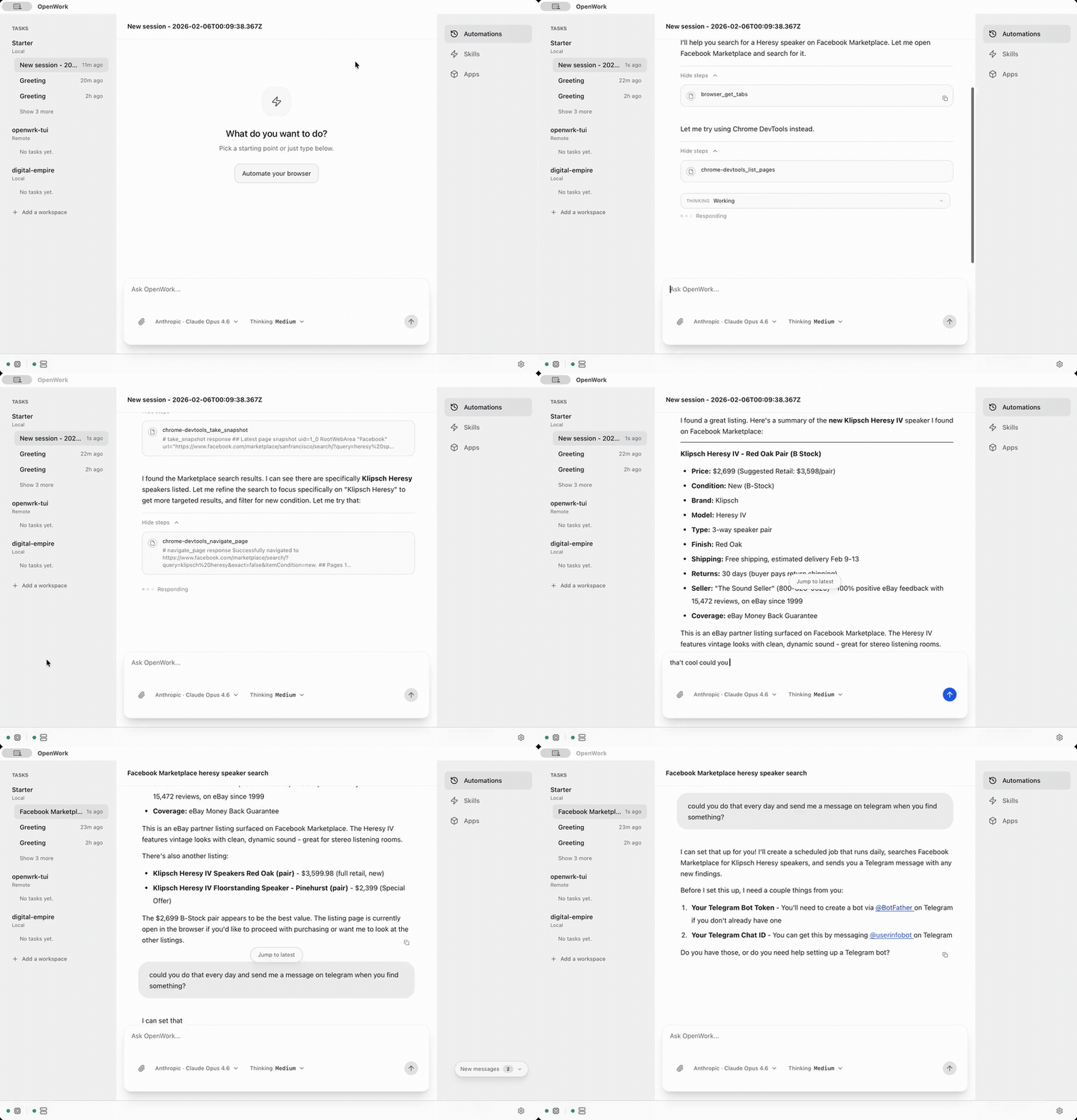
The project README itself contains the following key schematics, suitable for pre-sales notes or presentation materials:
2.1 Products Demo GIF
2.2 Skill Manager
2.3 Local / Server working mode
3. What can it mainly do
| Capabilities | Descriptions | Pre-Sales Value |
|---|---|---|
| Local AI Agent Workbench | Attractive when the user selects the working directory locally and runs the agentic workflow | Customers are concerned that the data does not leave the machine and the R & D/operation/document process is controllable |
| Multi-model/BYO Key | The official website said that the 50 LLM/provider supported by the OpenCode can be used with its own provider keys | Avoid single model binding, and facilitate the connection of existing model gateways, private models or multi-cloud policies of enterprises |
| host mode | local running OpenCode / OpenWork server / router | suitable for individuals or small teams to quickly try out without building a platform first |
| Client mode | Connect to an existing OpenCode/OpenWork server | Suitable for enterprises to do centralized worker, remote execution or controlled environment |
| Orchestrator CLI | Use 'openwork start' to manage sidecars after 'npm install -g openwork-orchestrator | You can use server/remote worker mode without desktop UI to facilitate PoC automation |
| Skills manager | manage '.opencode/skills' and import local skills into the workspace | can precipitate pre-sales/delivery/research and development processes into reusable "skill packs" |
| OpenCode plugins | Manage plug-ins via 'opencode.json', support project/global scope | Extensible to WakaTime, internal tools, audit, or custom integration |
| MCP servers | official website and enterprise documents emphasize that MCP connects internal data sources and tools | can connect customer CRM, knowledge base, work order, code base and data platform |
| Permissions | Display permission request and allow once/always/grant | Suitable for man-machine collaboration, controllable action and sensitive operation approval |
| Execution plan / todos | render OpenCode todos into timeline | make it easier for non-technical users to understand what the agent does |
| Templates | Save and rerun common workflow | Pre-sales can be packaged "standard job flow", such as requirements analysis, code review, document generation |
| Debug exports | Export runtime debug report and developer log stream in settings | Enterprise support, problem location, delivery operation and maintenance are more controllable |
4. Applicable Scenario
| Scenario | Fit | Typical Customer Demands | Recommended Methods |
|---|---|---|---|
| Enterprise AI Coding/R & D Efficiency | High | Want to use AI to modify code, generate tests and process issue, but worry about cloud tool binding and data risks | "OpenWork is an agent workbench that can run locally and connect to multiple models, and can make team engineering processes into templates and skill." |
| Pre-sales/Delivery Automation | High | Plan, Bidding, Requirement Clarification, Document Arrangement Repeated Labor | "Package SOP into skills, Team Members Import at One Click, Reduce Verbal Transmission of Experience." |
| Internal Knowledge Work Automation | Medium and High | Perform multi-step tasks on local files, knowledge bases, and work orders | "Interconnect with internal systems through MCP and plug-ins, so that agent has tools and context." |
| AI Assistant for Security Sensitive Organizations | Medium and High | I hope the files will stay in the local or controlled worker, and the model key will manage itself | "Local Priority BYO Key Enterprise Edition Desktop Policy/SSO can enter the controlled pilot." |
| Multi-model unified portal | in | has OpenAI, Anthropic, Google, local model or LiteLLM gateway | "do not lock customers to a model, model policy can be handed over to customers themselves." |
| Productization of team-level agent workflow | Gao | Want to copy an expert process to the team | "Build skill/plugin/MCP configuration at one time, and the team reuses it through links." |
5. Not suitable for the scene
| Not suitable for the scene | Reason | Suggestion |
|---|---|---|
| If you want to mature SaaS, use it out of the box without operation and maintenance | The project is still iterating at a high speed, there is alpha construction in the release, and there is a gated/commercial boundary in enterprise capability | Do PoC first, and it is not appropriate to directly promise that all employees will go online |
| Strict requirements for localization/intranet offline but no engineering team | Orchestrator can customize sidecar host, but complete privatization still requires engineering adaptation | Evaluation Enterprise/managed deployment/self-built model gateway |
| Only ordinary chat robots are required | OpenWork strengths are files, tools, workflows, agent execution, not simple question and answer | Consider lighter Chat UI or enterprise knowledge base question and answer |
| Strong compliance requirements for audit, DLP, and permission matrix | README mentions auditable/permissioned, but specific enterprise-level audit capabilities need to be measured | PoC must include log, permission, and data boundary verification |
| There is a strong demand for Windows free desktop downloads | README writes that Windows access currently support plan through paid; The official website FAQ calls macOS/Windows/Linux, but the warehouse README has paid support instructions for Windows | For Windows pilots, the current business policy should be confirmed first |
6. Core Competence List
| Module | Capacity Point | Remarks |
|---|---|---|
| Desktop App | macOS/Linux download, select the project directory locally, click UI to interact with agent | README also mentioned that Windows access support plan through paid, which needs to be confirmed according to the latest official website |
| OpenWork Orchestrator | Management opencode, openwork-server, and opencode-router sidecars | Support 'start', 'serve', 'daemon', workspace management, and health check |
| Server/Remote | Client mode can connect to existing server;Hosted cloud workers can connect after checkout from web app | Suitable for enterprise remote worker/managed worker |
| Sandbox | Orchestrator support for Docker / Apple container sandbox | Mountable workspace with additional mount allowlist |
| Permissions | permission request visualization and response | facilitates the inclusion of agent actions in approval |
| File sessions | JIT catalog batch read/write | Suitable for remote worker file synchronization, controlled read/write |
| Enterprise | SSO/SAML, SCIM, desktop policy, versioning, managed deployment, MCP consulting | Enterprise custom pricing |
7. Architecture/Deployment/Integration
The key deployment patterns of OpenWork can be understood in three layers:
- Desktop UI Layer: Users select working directories, create session, send prompt, view execution plan, and approve permission requests in desktop App.
- Host/Server layer: Run OpenWork server, OpenCode, and opencode-router locally or remotely, and transmit real-time events through SSE.
- Model and Tool Layer: Connects OpenCode supported provider, local models, plug-ins, skills, and MCP servers.
README high-level architecture description:
-Host mode The default runtime is 'openwork', which is installed by the openwork-orchestrator. It is responsible for orchestrate 'opencode', 'openwork-server', and optionally 'opencode-router '.
-fallback the runtime is 'direct', the desktop application spawn 'opencode serve -- hostname 127.0.0.1 -- port
-The UI uses '@ opencode-ai/sdk/v2/client' to connect to the server, list/create sessions, send prompts, subscribe to SSE events, read todos, and permission requests.
-Host mode is bound to '127.0.0.1 'by default, and is not exposed to the public network by default.
Orchestrator Quick Start:
npm install -g openwork-orchestrator
openwork start --workspace /path/to/workspace --approval auto
No TUI / log-only:
openwork serve --workspace /path/to/workspaceSandbox mode:
openwork start --sandbox auto --workspace /path/to/workspace --approval auto
openwork start --sandbox docker --workspace /path/to/workspace --approval auto
openwork start --sandbox container --workspace /path/to/workspace --approval auto
How to use #8.
8.1 ordinary users
- Download the desktop app from openworklabs.com/download or the GitHub Release.
- Prepare your own LLM provider key.
- Open the OpenWork and select Local workspace/project folder.
- Create a session and enter a task.
- View timeline/todos during execution to process permission requests.
- Save common processes as template or skill.
8.2 Engineering/Platform Team
Run from source:
git checkout dev
pnpm install --frozen-lockfile
pnpm dev
Desktop development prerequisites include Node pnpm, Bun 1.3.9, Rust/Tauri, Xcode CLT, or Linux WebKitGTK 4.1.
Web UI only:
pnpm dev:uiCommon calibration:
pnpm typecheck
pnpm build
pnpm test:e2e
9. What can I say before sales
9.1 a sentence positioning
OpenWork is an open source AI Agent workbench for teams: it can run locally on personal computers or connect to enterprise remote workers. Both OpenAI/Anthropic/Google and the enterprise's own model gateway can be used. More importantly, the team workflow can be encapsulated into skills, plugins and MCP configuration, and one-click sharing and multiplexing can be used.
9.2 Customer-Oriented Value Translation
| Customer Pain Points | OpenWork Speech |
|---|---|
| "AI tools are too scattered, everyone uses their own" | use OpenWork to unify the model, skills, plugins and MCP into a team workbench |
| "Worry about sending code/documents to uncontrolled platforms" | Desktop local priority, files stay on this machine; Model key is controlled by customers themselves |
| "Expert experience cannot be copied" | Encapsulate expert's prompt words, tool calls, and SOP into skill/template, and the team can reuse them with one click |
| "AI agent black box, I don't know what to do" | execution plan, todos, permission requests, debug exports help to be explainable and traceable |
| "Enterprise requires SSO and Desktop Control" | Enterprise directions include SSO/SAML, SCIM, desktop policies, versioning, and managed deployment |
| "We already have model gateways/private models" | BYO keys / BYO inference, which can be connected to multi-model and enterprise model policies |
9.3 Demo process suitable for demonstration
- Open the OpenWork and select a real project directory.
- Import a team skill, such as "requirements document to development task" or "code review".
- Let agent read files, form plans and apply for permissions.
- Show execution plan/todos and permission approval.
- Let it generate PR drafts, test lists, or scenario documents.
- Demo saves the workflow as a template/skill and shares it with another team member.
10. Frequently Asked Customer Questions
| Question | Suggested Answer |
|---|---|
| Is it SaaS? | Not a single SaaS. Desktop apps can run locally and also support connecting to remote server/hosted workers. |
| Will the file be uploaded to the OpenWork cloud? | README/official website emphasizes that files in desktop mode will remain on this machine and prompt will be sent to the LLM provider selected by the user. Hosted cloud workers is optional. When PoC you want to actually verify the network flow and logs. |
| What models are supported? | OpenCode supported models and 50 provider are officially supported, including OpenAI, Anthropic, Google, and local models. |
| Is it free? | Desktop App is free and open source. The official website pricing shows that Team Starter the first 5 seats free, then $10/seat/month;Enterprise custom. |
| What's in Enterprise Edition? | SSO/SAML, SCIM, Desktop Policy, Versioning, Managed Deployment, Self-Hosting/Hosting, Skills Development, MCP Consulting, and more. |
| What's the difference between Claude Cowork/Codex? | Open source, BYO keys, multi-provider, local first, combinable skills/plugins/MCP, team shareable configuration. |
| Can I deploy it in the intranet? | Self-hosting/managed deployment is possible, but the sidecar, model gateway, MCP, identity system, update source, and O & M process need to be evaluated. |
| Is the License commercially available? | The principal MIT;'/ee' directory has another Fair Source License boundary. Before commercial use, the legal department shall confirm the specific scope of use. |
11. PoC Recommendations
| PoC Items | Validation Contents | Success Criteria |
|---|---|---|
| local file security boundary | whether the file stays on the local computer and what content is sent to the model. | provider can list the network flow, logs and sensitive data processing methods. |
| Model access | Connect existing OpenAI/Anthropic/Google/LiteLLM/private models of the enterprise | Key models are available and failures can be diagnosed |
| Skill Workflow | Select 2-3 pre-sales/R & D/delivery processes to do skill | Non-expert users can reuse, stable output quality |
| Permission approval | File writing, command execution, and external tool call approval | Clear approval path and controllable misoperation |
| MCP integration | connected to an internal system, such as knowledge base, work order, code warehouse | agent can read/write controlled data, permissions can be tracked |
| Team/Enterprise Capabilities | SSO, Desktop Policy, Version pinning, Distribution keys | Identify Free, Team, and Enterprise |
| Operations and Logs | Debug export, server logs, run id, health check | Problems can be reproduced, located, and submitted to the manufacturer for support |
12. Risks and Considerations
| Risk | Description | Pre-sales advice |
|---|---|---|
| The project is still in rapid iteration. | The release is frequent and there are a lot of alpha builds. | Don't directly promise stable production-level capabilities, do a small-scale PoC first. |
| Business Boundary Changes | README, official website and enterprise gating Documents Show Team/Enterprise Function Boundary | Official website/contract shall prevail before quoting or promising customers |
| License Mixed | Subject MIT, BUT '/ee' is Fair Source License | Legal Affairs Required Before Privatization, Second Opening and Resale |
| Data security needs to be measured. | "Local priority" is not equal to zero data. If the data is sent out, the model provider will still be sent at a prompt. | PoC adds traffic, logs, sensitive words, and model gateway tests. |
| Windows support caliber needs to be confirmed | README mentions that Windows access currently handled through pay support plan;release Windows asset | If customers Windows large-scale desktops, they need to confirm the current policy in advance |
| Enterprise capabilities may depend on hosted Den / EE components | SSO, desktop policies, SCIM, managed deployment, etc. are enterprise packaging | It is necessary to clarify whether the customer accepts the commercial version or service support |
13. My Pre-Sales Judgment
OpenWork is an open source candidate to be positioned as the Enterprise AI Agent Workbench and the AI Coding/Knowledge Work Automation Platform. Its strength is not simply chatting, but combining local files, model provider, skills, plugins, MCP, permission approval and team sharing to form a replicable workflow.
For pre-sales, it has three easy-to-talk grips:
- Local Priority BYO Key: For customers who are concerned about code, document, key, and vendor lock-in.
- Workflow Productization : Expert experience can be packaged into skills/templates for team reuse.
- Clear landing path for enterprises : from free desktop pilot, to Team Starter, to Enterprise SSO, desktop strategy, managed deployment and MCP consultation.
However, be cautious: it is still a fast-evolving project. Enterprise-level projects cannot only look at GitHub stars, but also need actual PoC to verify stability, security boundary, plug-in/MCP controllability, model access, log audit and enterprise function authorization.