1. Project Overview
| Dimension | Information |
|---|---|
| Project name | ComfyUI |
| GitHub | Comfy-Org/ComfyUI |
| official website | comfy.org |
| Official Documentation | docs.comfy.org |
| Project Positioning | Node-based generative AI Workflow Engine and Inference Backend |
| GitHub Description | The most powerful and modular diffusion model GUI, api and backend with a graph/nodes interface |
| Open Source Protocol | GNU GPL v3 |
| Main Language | Python |
| Python requirements | 'pyproject.toml' callout '>= 3.10';README recommends Python 3.13.3.12 available if you encounter dependency problems |
| Current Version | '0.26.0 ' |
| Latest Release | 'v0.26.0 ',2026-06-23 Released |
| Warehouse Heat | 2026-06-30 Inspection: About 119k stars, 13.9k forks, 3.8k issues, 353 PR |
| Supported platforms | Windows, Linux, macOS;NVIDIA, AMD, Intel, Apple Silicon, Ascend, Cambricon, Iluvatar and other hardware paths |
| Comfy Desktop, Comfy Cloud, Comfy API, Comfy Enterprise, Comfy MCP |
One sentence positioning of the ComfyUI: It is an open workbench that uses node graphs to build a generative AI pipeline. For business users, it is like an advanced visual authoring tool; for technical teams, it is an integrable local/cloud reasoning backend; for enterprise customers, it can become the infrastructure for internal visual generation, video generation, 3D generation, marketing material production and creative automation.
2. Official schematics and key visuals
2.1 ComfyUI official interface screenshots
README comes with official interface screenshots, which can intuitively see its node workflow form:
Pre-sales interpretation: This chart is suitable for explaining the differences between ComfyUI and ordinary Wensheng chart tools. Common tools are usually an input box with several parameters, while ComfyUI split the model loading, prompt words, ControlNet, sampling, VAE, post-processing, output and other steps into nodes to form a reusable, debuggable and versioned production line.
2.2 Workflow Official Simple Schematic
Simple workflow illustration in the official documentation:
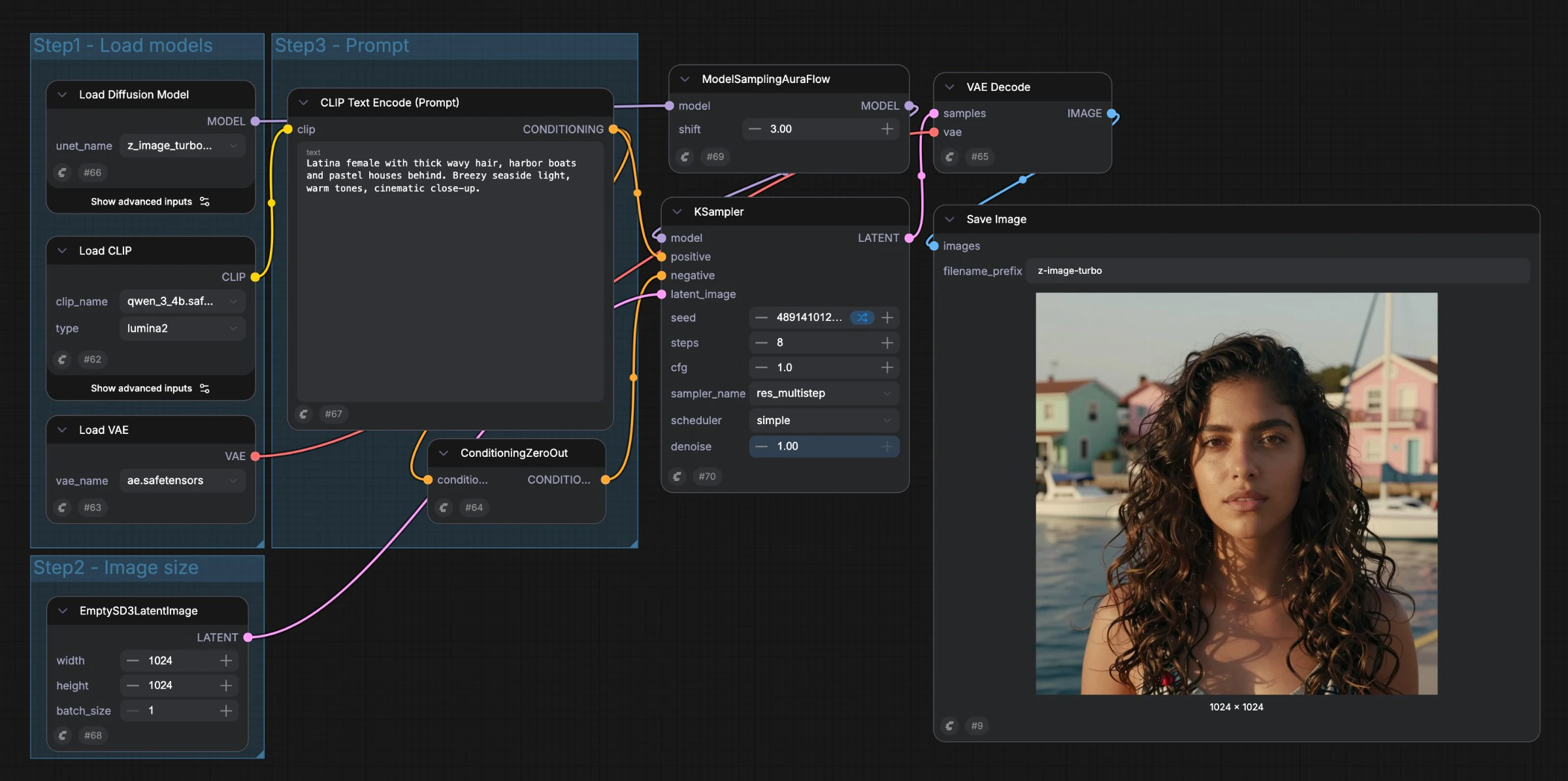
2.3 Workflow official complex schematic
Complex workflow schematic in official documentation:
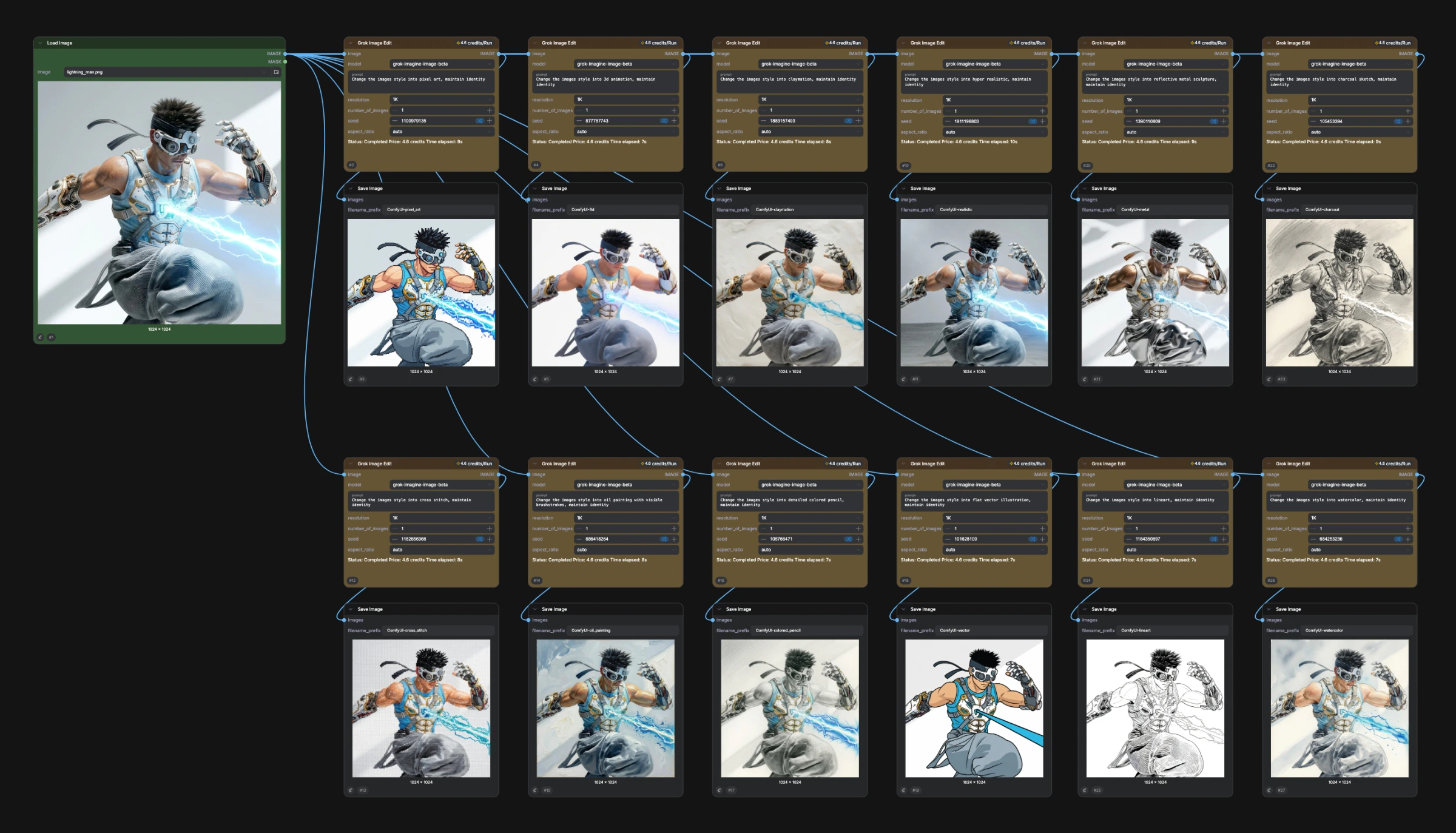
Pre-sales interpretation: These two diagrams can help customers understand the transition from "simple production" to "complex production process. Complex workflows can string together multiple models, multiple steps, multiple control conditions, and multiple post-processing, which is suitable for reusable enterprise templates.
Official Schematic of 2.4 App Mode
App Mode can wrap complex node graphs into a simpler input/output interface for non-technical users.

Pre-sales interpretation: This is a key capability for ComfyUI to move from "professional workbench" to "business application. After technical or creative experts build complex workflows, they can expose adjustable parameters to business users. Business users only need to upload materials, enter copy, select parameters and click Run.
2.5 Partner Nodes Official Schematic
Partner Nodes are used to invoke closed-source or third-party managed models in ComfyUI workflows.
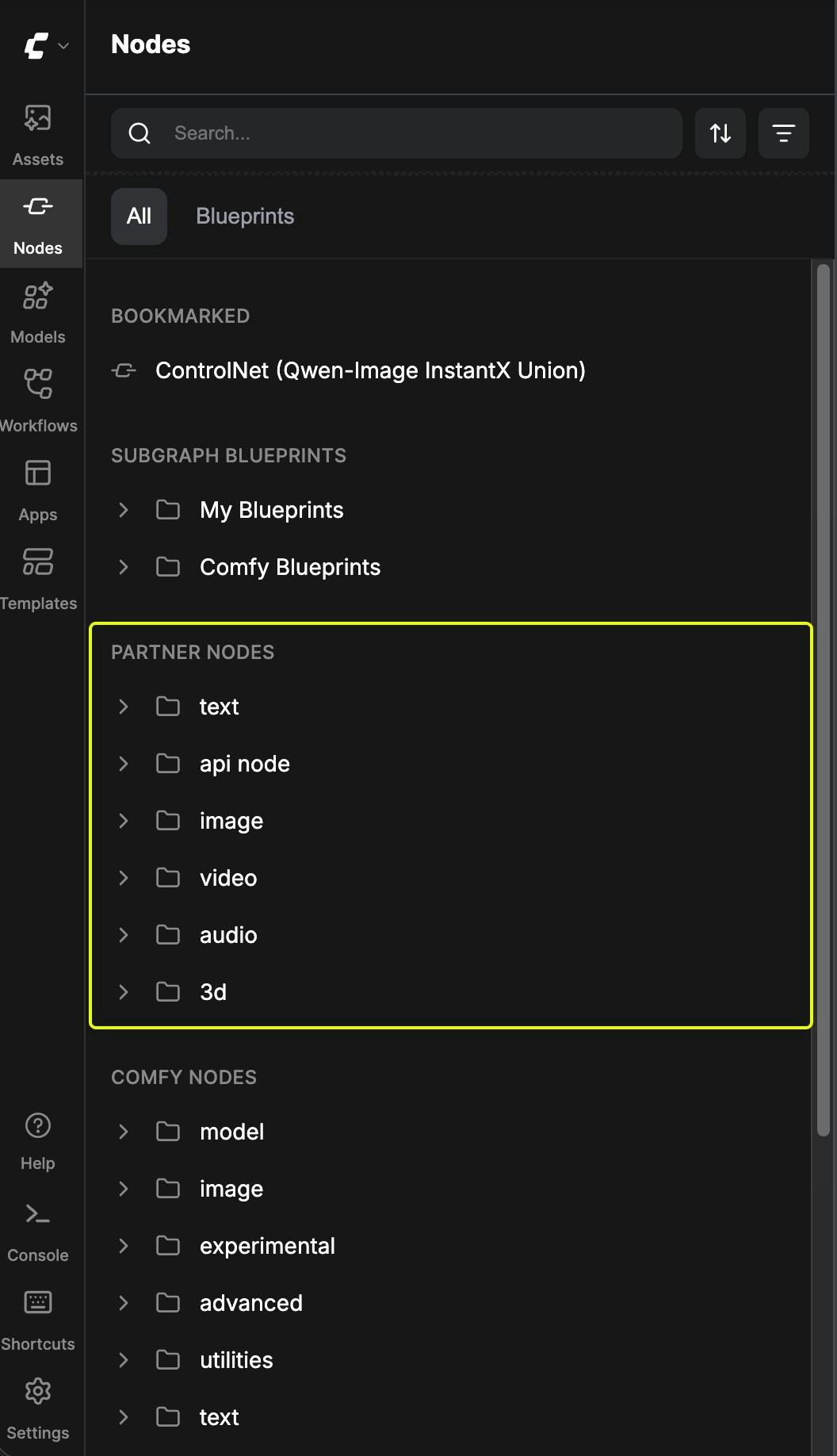
Pre-sales interpretation: This shows that ComfyUI is not only a local open source model UI, but also becoming a "unified generative AI orchestration interface" that can combine local open source models, cloud closed source models, post-processing nodes and enterprise processes into the same pipeline.
3. What can it mainly do
3.1 node generation workflow
The core of the ComfyUI is the node graph. A workflow is a graph formed by connecting multiple nodes, which can generate images, videos, audio, 3D models, AI models, and even combine with AI agent processes.
The value of node-based workflows:
-Each step is visible: model, cue word, sampler, size, seed, post-processing are all in the figure.
-Adjustable every step: Parameters are not hidden in the black box tool.
-Reusable every step: Workflows can be saved as JSON or embedded to generate image metadata.
-Each step can be combined: local model, closed-source API, post-processing, upload/download and custom nodes can be concatenated.
3.2 image generation and editing
The scope of support listed in the README includes:
-SD1.x, SD2.x
-SDXL, SDXL Turbo
-Stable Cascade
-SD3/SD3.5
-PixArt Alpha / Sigma
-AuraFlow
-HunyuanDiT
-Flux, Flux Kontext, Flux 2
-Lumina Image 2.0
-HiDream, HiDream E1.1
-Qwen Image, Qwen Image Edit
-Hunyuan Image 2.1
-Z Image
-Ernie Image
-Inpainting
-ControlNet and T2I-Adapter
-Area Composition
-Upscale
-LoRA, Hypernetwork, Textual Inversion
Pre-sales can be said: it covers the "front-line battlefield of open model ecology", and the community and officials usually follow up soon after the new model comes out.
3.3 video, audio and 3D generation
README explicitly lists:
| Type | Example |
|---|---|
| Video | Stable Video Diffusion, Mochi, LTX-Video, Hunyuan Video, Wan 2.1, Wan 2.2, Hunyuan Video 1.5 |
| Audio | Stable Audio, ACE Step |
| 3D | Hunyuan3D 2.0 |
The official website also points the application industry to VFX & Animation, Advertising & Creative Studios, Gaming, eCommerce & Fashion, etc.
3.4 workflow reuse, sharing and templating
ComfyUI support:
-Workflow is saved as JSON.
-Generate PNG/WebP/FLAC files to save full workflow and seed.
-Drag and drop the generated picture back to the web page to load the workflow at that time.
-Use the official Workflow Templates.
-Use the community workflow on Comfy Hub.
Pre-sales value:
-Creative processes can be precipitated as assets.
-High quality cue words and node combinations can be reused.
-Teams can build internal template libraries.
-The output can be traced back, which is convenient for reprinting "how this picture was generated".
3.5 App Mode: Turn complex workflows into simple applications
Official App Mode documentation: Custom input/output interfaces can be defined for workflow, allowing users to use complex workflows without editing nodes.
Typical process:
- Select the input to be exposed, such as image upload, text prompt, model selection.
- Select the output you want to show, such as Preview or Save Image.
- Preview the app layout.
- Set the default open view to App or Node Graph.
- Generate links through Share and let others run workflow directly.
Pre-sales value:
-Experts design workflows, business users use workflows.
-The ability to package ComfyUI from "expert tools" to "business applications".
-Suitable for internal marketing material generator, commodity map generator, poster generator, stylized avatar generator and other scenes.
3.6 APIs, Queues, and Production Integration
Official server routines document description: when the Web client submits the workflow, it will POST to '/prompt'. after the server verifies the prompt, it will join the execution queue and return the prompt_id and queue position, or return an error message.
Common API:
| Route | Purpose |
|---|---|
| '/' | Load Comfy Web Page |
| '/ws' | WebSocket real-time communication |
| '/prompt' GET/POST | View queue status and submission workflow |
| '/queue' GET/POST | View or manage execution queues |
| '/history' GET/POST | View or manage execution history |
| '/upload/image' | Upload an image |
| '/view' | View generated images |
| '/system_stats' | View system information such as Python, devices, video memory, etc. |
| '/object_info' | View information about all node types |
| '/models' | View model type |
| '/models/{folder}' | View a model |
Pre-sales value:
-Can be embedded in enterprise systems, not just as a stand-alone UI.
-Support queuing, progress, history, upload, output view.
-Can be connected to e-commerce commodity map system, content platform, material library, DAM and marketing automation system.
3.7 Partner Nodes: Access Closed Source/Third Party Model
Partner Nodes allows calling external API models in ComfyUI workflow. Officially, its advantages include:
-Use a closed-source or third-party hosted model, no need to deploy yourself.
-Compatible with other ComfyUI nodes.
-No need for complex API key management.
-Prepaid credits to control costs.
-Completely optional, ComfyUI core remains open source and available locally.
Can be used for hybrid workflows:
-Generate base map with GPT-Image-1, and then generate video with local Wan node.
-Generate images with external models, and then go local super-score, style transfer or post-processing.
-Combine open source and business models into the same process.
If the customer does not wish to have outreach, they can do so through:
python main.py --disable-api-nodesDisable all API nodes and prevent the frontend from communicating with the internet.
3.8 Agent Tools / MCP
The official documentation shows that ComfyUI provides MCP servers and Comfy CLI, allowing AI agents and developers to generate pictures, videos, audio and 3D content without always opening the canvas.
| Way | Type | Fit |
|---|---|---|
| Comfy Cloud MCP | Remote hosting | Chat-driven agents, template search, cloud GPU |
| Comfy Partner MCP | Local MCP server | Unified generation through 30 partner providers |
| Comfy CLI | Local CLI | Script, CI, Batch |
Pre-sales value:
-Can connect ComfyUI to Claude, Cursor, Codex, Enterprise Agent platform.
-Agent can initiate image, video, 3D, audio generation through natural language.
-Suitable for incorporating AIGC capabilities into enterprise intelligence workflows.
4. Applicable Scenario
4.1 Advertising and Creative Studio
Suitable for:
-Poster generation
-split mirror and moodboard
-Brand visual style exploration
-Multi-version footage A/B testing
-Creative concept maps and visual proposals
Value:
-Quickly iterate on a large number of visual directions.
-Node workflows ensure that styles and parameters are reusable.
-App Mode enables planning, operations, and design assistants to use expert workflows.
4.2 e-commerce and commodity map production
Suitable for:
-Commodity background replacement
-Model Dress-up
-Commodity Scene
-Batch stylized
-Super points and fixes
-SKU multi-version footage generation
Value:
-Solidify the "Commodity Chart Input → Background/Style/Size/Output" process into a workflow.
-Access to the product material library and content production platform through API.
-Suitable for batch processing and large-scale production.
4.3 games, art and conceptual design
Suitable for:
-Role setting
-Scene concept map
-Prop diagram
-Maps and styles to explore
-3D Asset First Draft
Value:
-Multi-model, multi-LoRA, multi-control condition combination.
-Can record the complete parameters and generation path, convenient art team double disk.
-Similar to Blender/Nuke/Maya class node diagram thinking, easy for professional users to understand.
4.4 film and television, animation and VFX
Suitable for:
-Concept vision
-Style reference
-Lens diagram
-Video generation/framing/stylization
-Background and footage generation
Value:
-Supports video models and complex post-processing processes.
-The node graph is suitable for professional production of links.
-Can be in the local GPU environment to ensure that the material and IP does not leak.
4.5 the AIGC platform inside the enterprise
Suitable for construction:
-Internal vision generation platform
-Reusable workflow template library
-Brand normalization generation tool
-Multi-model unified entrance
-Generated media capability AI agent invocation
Value:
-ComfyUI as workflow engine.
-App Mode as a business usage layer.
-Local API / Cloud API / MCP as the system integration layer.
-Custom nodes and ComfyUI-Manager extend enterprise capabilities.
5. Not suitable for the scene
| Scenario | Reason |
|---|
As long as the simplest Wensheng picture | Midjourney, namely dream, bean bag, DALL · E and other products have lower threshold |
| Non-technical users directly build complex processes | Node diagram learning costs are high and requires templates or App Mode |
| Strong SaaS hosting, zero operation and maintenance requirements | Local ComfyUI requires model, graphics card, dependency, plug-in maintenance; Comfy Cloud can be considered |
| Commercial redistribution sensitive to open source license restrictions | GPL v3 has copyleft requirements, and product distribution requires legal evaluation |
| High requirements for certainty of results and compliance review | Generative AI outputs need to be reviewed and cannot be brought online without manual processes |
| Large-scale high-concurrency production without GPU/queue/monitoring construction | Requires specialized computing power scheduling, storage, auditing and task governance |
6. Core Competence List
| Capabilities | Descriptions | Pre-Sales Value |
|---|---|---|
| Node Graph | Node-based visualization workflow | Professional, controllable, reusable, and auditable |
| Multi-model support | Picture, edit, video, audio, 3D | One interface covers multiple generation tasks |
| local offline operation | core does not actively download content, supports full offline | suitable for data/IP sensitive customers |
| API Nodes | Optional call closed-source/third-party models | Hybrid on-premises and cloud-based SOTA capabilities |
| App Mode | Complex processes are packaged into simple applications | Lower the threshold for business users |
| Local API | '/prompt','/queue', '/history','/ws', etc. | Can connect to enterprise systems and automation processes |
| Asynchronous queue | Submission task, queuing, cancellation, and history | Support production task management |
| Incremental execution | Re-execute only the changed part | Improve iteration efficiency and save video memory and time |
| Intelligent memory management | Low memory offload | Lower hardware threshold |
| Workflow metadata | workflow saved in PNG/WebP/FLAC | Results are traceable and reproducible |
| Custom Nodes | Community and Enterprise Customization Extensions | Strong and Customization |
| ComfyUI-Manager | Manage custom nodes | Reduce extended maintenance costs |
| MCP / CLI | Agent and script invocation generation capabilities | Access agents, CI, batch processing |
7. Architecture, Deployment and Integration
7.1 Infrastructure Understanding
7.2 local deployment method
Official offers multiple paths:
| Way | Fit |
|---|---|
| Desktop Application | Windows/macOS users get started quickly |
| Windows Portable Package | Portable for Windows users, suitable for NVIDIA/AMD/Intel packages |
| comfy-cli | Command-line installation and startup |
| Manual Install | Windows/Linux/macOS/Multiple Hardware Platforms |
| Comfy Cloud | No on-premises hardware or want a cloud GPU |
7.3 Installation Command Example
Use comfy-cli:
pip install comfy-cli
comfy install
Manual installation:
git clone https://github.com/Comfy-Org/ComfyUI.git
cd ComfyUI
pip install -r requirements.txt
python main.py
NVIDIA PyTorch example:
pip install torch torchvision torchaudio --extra-index-url https://download.pytorch.org/whl/cu130Enable ComfyUI-Manager:
pip install -r manager_requirements.txt
python main.py --enable-manager
7.4 Production Integration Recommendations
For enterprise integration, a layered design is recommended:
| Level | Recommendation |
|---|---|
| Creation Layer | workflow experts with ComfyUI/Comfy Desktop |
| Application layer | Expose business parameters with App Mode |
| Service layer | Service system is connected through '/prompt','/queue', '/history','/ws' |
| Compute Layer | Local GPU, private GPU cluster, or Comfy Cloud |
| Asset layer | DAM, material library, object storage, audit system |
| Governance Level | Permissions, Cost, Model Version, Template Version, Logs, Content Audit |
8. What can I say before sales
8.1 for Business Owner
ComfyUI can transform image, video, 3D, and audio generation from a "personal trial tool" to a "team-reusable content production process". After the creative experts set up the process, business personnel can simplify the operation of the interface to reduce repeated communication and manual adjustment.
8.2 for creative and design teams
The advantage of ComfyUI is control. Each model, parameter, processing step, and output is visible, tunable, and reusable. It is suitable for professional visual teams to explore styles, generate materials in batches, and solidify brand visual processes.
8.3 for Technical Leader
The ComfyUI is both a GUI and an API and a backend. It provides prompt queue, WebSocket progress, system status, model list, historical record and object information interface, can be connected to the enterprise internal production system. Custom nodes and MCPs are also easily extensible.
8.4 for Security/Compliance Heads
ComfyUI core can be run completely locally and offline. If the enterprise does not want outreach, it can disable API nodes through '-- disable-api-nodes. Note the GPL v3 license, model rights, training data sources, output content moderation, and user upload material security.
9. Customer pain point mapping
| Customer pain points | ComfyUI response capabilities |
|---|---|
| The single generation tool is not reusable | Workflow JSON, node graph, template library |
| Results are difficult to reproduce | Generate embedded workflow and seeds |
| Professional process is too complicated for business users to use | App Mode |
| Local Open Source Model and Closed Source Model Split | Partner Nodes / API Nodes |
| Creative process requires system integration | Local API, Cloud API, MCP, CLI |
| Data and materials do not want to be sent out. | Run offline locally and disable API nodes. |
| Multi-model switching and fast adaptation of new models | Open model ecology, custom nodes, and ComfyUI-Manager |
| Batch task missing queue | Asynchronous queue, history, interrupt |
10. Frequently Asked Customer Questions
| What's the difference between ComfyUI and Midjourney/instant dream products? | Those products are more like out-of-the-box generation services ComfyUI more like controllable workflow engines for professional teams and enterprise processes. | |||||||||||||||||||||||||||||||||||||||||||||||||||||||||||||||||||||||||||||||||||||||||||
| Can ordinary business personnel use it? | There is a threshold for directly editing node diagrams, but App Mode can encapsulate complex workflow into simple forms and output interfaces. |
Can | be deployed privately? | Can run locally, core can be offline; however, you need to manage your own models, GPUs, plug-ins, security, and O & M. |
| Can I call business models? | You can call closed-source or managed models through Partner/API Nodes, or you can disable these nodes completely. |
| Can I connect to an enterprise system? | Can I integrate with a local API, Cloud API, MCP, CLI, or a custom node. |
| What's the license note? | ComfyUI is GPL v3. Internal use is usually less problematic, but requires legal evaluation, such as secondary distribution, embedding of commercial products or closed source modification. |
| Can I do video/3D/audio? | README lists video, audio and 3D models supported, but the effect depends on the model, power and workflow. |
| Are the hardware requirements high? | Generating class models usually relies on the GPU;ComfyUI memory management and CPU mode, the CPU will be slow. Comfy Cloud is also an option. |
11. PoC Recommendations
11.1 PoC 1: Brand Marketing Material Generator
Objective: To establish a reusable workflow for customer brands, input product drawings, activity themes and dimensions, and output multi-version posters or social media drawings.
Validation metrics:
| Indicator | Description |
|---|---|
| brand consistency | style, color, font, composition is stable |
| Reusability | Can the same workflow cover multiple products/SKUs |
| Use threshold | Can business users operate independently under App Mode |
| Efficiency | How much less time it takes to get from demand to first draft |
| Review | Whether to retain workflow and parameters for easy re-posting |
11.2 PoC II: Batch Processing of E-commerce Commodity Chart
Objective: Access commodity maps and SKU data to generate background maps, scene maps, and super-sub-maps in batches.
Validation metrics:
-Batch Throughput
-Single graph generation cost
-Failure rate
-Queue management capabilities
-Consistency of results
-API integration convenience
11.3 PoC III: Creative Team Workflow Template Library
Target: Precipitate 5-10 common workflow templates, such as avatar stylization, background replacement, ControlNet posture, video cover, and short video stylization.
Validation metrics:
-Template reusable degree
-Template sharing and version management
-custom nodes depends on stability
-New user learning costs
11.4 PoC IV: Agent Call ComfyUI to Generate Content
Objective: Let the enterprise Agent call ComfyUI through MCP or API to complete the process of "text requirements → generate visual materials → return results.
Validation metrics:
-MCP/CLI/API call success rate
-Generate task status backhaul
-Multi-round modification experience
-Authority and cost control
-Content audit link
12. Risks and Considerations
12.1 GPL v3 License
ComfyUI use GPL v3. It is generally friendly for internal research, internal use, and self-hosting, but if the customer plans to redistribute, embed commercial software, modify closed source, or provide SaaS, legal confirmation of the obligation boundary is required.
12.2 model and material copyright
ComfyUI is a tool, output compliance depends on:
-Licensing of models used
-LoRA/ControlNet/footage license
-Enter material authorization
-Whether the generated content infringes the rights of third parties
-Regulatory requirements for AI content in the customer's region
Do not promise that "the generated content is naturally commercially available" before sales. Customers must confirm item by item according to the model and material source.
12.3 Custom Nodes Ecological Risk
ComfyUI's expansion ecology is strong, but custom nodes also bring:
-Dependency Conflict
-Version compatibility issues
-Security risks
-Maintainers stop updating
-Workflow migration failed
Production suggestion: Establish a node whitelist and version locking mechanism approved by the enterprise.
12.4 API Nodes outreach and fees
Partner Nodes/API Nodes is an optional capability that involves accounts, credits, networks, and external API calls. If the enterprise is sensitive to data outgoing, it should be disabled or approved separately.
12.5 computing power and operation and maintenance
Local deployment needs to consider:
-GPU model and memory
-Model storage
-Task Queue
-Concurrency control
-Monitoring alarm
-Output file storage
-User permissions
-Plugin upgrade
13. Comparison with adjacent schemes
| Scenario | Better | For | Differences from ComfyUI |
|---|---|---|---|
| Midjourney/Dream/DALL · E | Fast Plot, Low Threshold Creation | Weak Control, Privatization and Process Integration | |
| Stable Diffusion WebUI | Personal/Semi-Professional SD Operations | ComfyUI More Emphasis on Node Workflow and Composability | |
| Photoshop Firefly | Designer Image Editing | More traditional design tools, weaker open model ecology | |
| Runway / Pika / Kling | Video Generation Products | ComfyUI can incorporate video models into more complex processes | |
| Dify/Agent platform | Text/Tool Agent | ComfyUI more visual/multimedia generation engine | |
| Self-developed reasoning services | Strong customization, large-scale production | High cost, ComfyUI more suitable for rapid construction and verification |
14. My Pre-Sales Judgment
ComfyUI is an open source project in the field of AIGC vision production that deserves special attention. Its greatest value is not "another literary graph UI", but to turn generative AI into a visual, composable, reusable, and traceable workflow system.
For pre-sales, it is suitable for cutting in the following opportunities:
-The client wants to build an internal AIGC authoring platform.
-Customers have a large number of marketing, e-commerce, games, film and television, design material production needs.
-Customers are not satisfied with a single SaaS plotting tool and want to control models, parameters, processes and data.
-The customer needs to connect the AIGC capability to the business system or Agent platform.
At the same time to remind customers: the ComfyUI itself is not a complete corporate governance platform. Production landing also needs to complete identity permissions, template governance, node whitelist, model copyright, content audit, GPU scheduling, log audit, cost control and compliance process.
A pre-sales summary:
ComfyUI is suitable as an enterprise vision AIGC workflow engine: experts use node diagram to build processes, businesses use App Mode to run processes, systems use API/MCP to adjust processes, and enterprises use governance and computing power platforms to manage processes.