1. One sentence positioning
CLI-Anything is an open source project that transforms existing software into an Agent-native CLI.
It is not an ordinary command-line tool, nor is it a GUI automation framework, but a set of methodology, plug-ins, sample harness, and CLI ecology that "make any software with a code base into an operational tool for AI agents.
This can be explained to the customer:
In the past, we let AI Agent look at the screen, find buttons and click coordinates like a human. This method is easily affected by interface changes, window size and loading delay. The CLI-Anything idea is the other way around: add a structured command line interface to the software, allowing the Agent to directly operate the real software with commands, status, and JSON results.
2. What problem does it mainly solve
Natural Vulnerability of 2.1 GUI Agent
The summary of arXiv's technical report makes the problem very clear: the current mainstream computer use scheme often allows Agent to operate the application through screenshots, visual recognition and coordinate clicks. This poses several problems:
| Pixel-level interaction is fragile | UI skin change, button movement, pop-up window change will fail | Automation has poor stability and high maintenance cost | ||||||||||||||||||||||||||||||||||||||||||||||||||||||||||||||||||||||||||||||||||||||||||||||
| Time Dependence | Slow Page Load, Animation Delay and Network Fluctuation All Affect Click | Task Success Rate Uncontrollable | ||||||||||||||||||||||||||||||||||||||||||||||||||||||||||||||||||||||||||||||||||||||||||||||
| The status cannot be read explicitly | The agent can only "see" the interface, so it is difficult to obtain the complete structured status | It is difficult to make reliable judgment and rollback | ||||||||||||||||||||||||||||||||||||||||||||||||||||||||||||||||||||||||||||||||||||||||||||||
| Output is difficult to verify | The completion of GUI operation does not mean that the file/result is true and correct | High risk in production environment | ||||||||||||||||||||||||||||||||||||||||||||||||||||||||||||||||||||||||||||||||||||||||||||||
| Difficult to scale | Each software and version must be re-adapted to the visual path | Enterprise landing cost is high |
The CLI-Anything solution is: do not let the Agent simulate human visual limitations, but let the software expose interfaces that are more suitable for the Agent.
2.2 Agent lacks real professional software capabilities
Many enterprises want to use professional software for agents, but they will encounter two extremes:
-Direct GUI automation: can use existing software, but not stable.
-Re-write a lightweight alternative: stable, but far less functional than real software.
CLI-Anything emphasis on "real software integration": the CLI generates legitimate project files or scripts and then invokes real backend rendering/exporting. For example:
-LibreOffice: Generate ODF, and then use 'libreoffice -- headless' to export PDF/docx/XLSX/PPTX.
-Blender: Generate bpy script and render it with' blender -- background -- python.
-Inkscape: Operate SVG and export it with Inkscape.
-Shotcut/Kdenlive: Generate MLT XML and render it with 'melt' or 'ffmpeg.
-OBS: Control real OBS with obs-websocket.
This principle is key: it is a "structured interface to real software", not a toy rewrite.
3. What can it mainly do
3.1 Install Existing CLI Using CLI-Hub
The CLI-Hub is the CLI-Anything eco-portal for browsing, searching, installing, updating, uninstalling, and launching the community's existing CLI.
pip install cli-anything-hub

cli-hub list
cli-hub search image
cli-hub info gimp
cli-hub install gimp
cli-hub launch gimp
Pre-Sales Interpretation:
-If the customer wants to verify "whether the Agent can use professional software", he can first find out whether the corresponding tool exists in the CLI-Hub.
-This is faster than building harness from scratch and is suitable for demo and early PoC.
-Note: Some CLIs still rely on real upstream software, such as GIMP, Blender, LibreOffice, which is still installed locally or on the server.
3.2 Generate Agent Available CLI for New Software
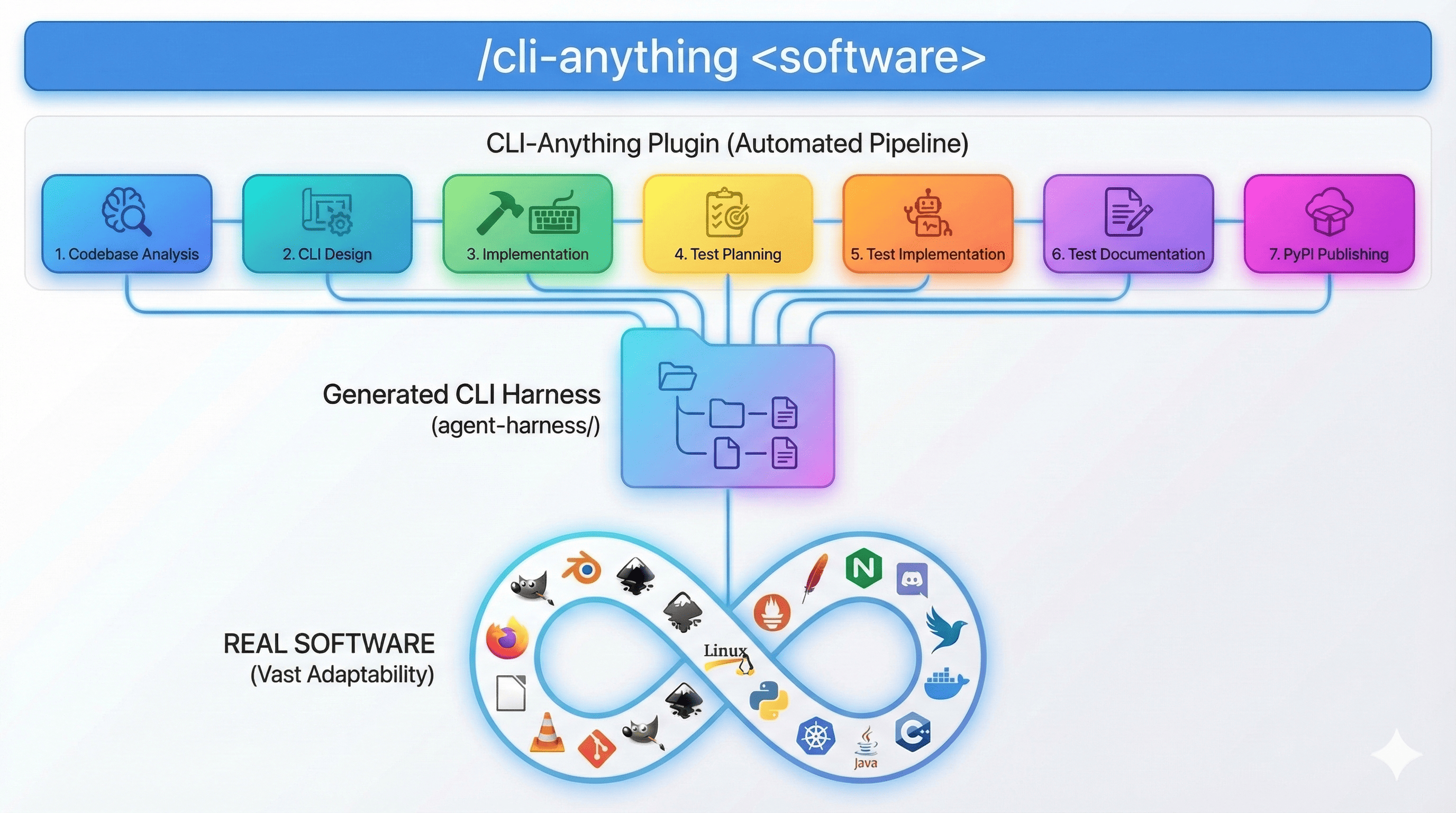
If the CLI-Hub does not have the target software, the CLI-Anything 7-stage build process can be used:
| Phases | Official Process | Pre-Sales Understanding |
|---|---|---|
| 1. Analyze | Scan the source code to find GUI actions, data models, back-end interfaces | Find out where the real capabilities of this software are |
| 2. Design | Design command group, state model, output format | Organize software capabilities into operation surfaces that Agent can understand |
| 3. Implement | Use Click to implement CLI, REPL, JSON output, undo/redo | Generate interactive and scriptable command tools |
| 4. Plan Tests | Write the TEST.md test plan first | Avoid only doing demo and not verifying |
| 5. Write Tests | Write single test, end-to-end test, real back-end test | Verify real workflow |
| 6. Document | Update Test Results and Documentation | Make Tools Handover and Maintainable |
| 6.5 Skill | Generate SKILL.md | Let the agent automatically discover and use it later |
| 7. Publish | Generate setup.py and install it on the PATH | Enter the team reusable state |
Typical commands:
/cli-anything ./gimp
/cli-anything https://github.com/blender/blender
/cli-anything:refine ./gimp "batch processing and filters"
/cli-anything:test ./inkscape
/cli-anything:validate ./audacity
3.3 Verified harness example
README shows that the project has covered many types of software, including:
| Category | Example | Customer Value |
|---|---|---|
| Creativity and Media | GIMP, Blender, Inkscape, Audacity, Kdenlive, Shotcut, OBS | Let the Agent automatically generate pictures, videos, live scenes, and audio processing |
| Office and Knowledge Management | LibreOffice, Zotero, Joplin, Calibre | Automatically generate reports, process documents, manage databases |
| Charts and Visualizations | Draw.io, Mermaid | Automatically generate architecture diagrams, flowcharts, and explanatory materials |
| AI/ML platform | ComfyUI, Ollama, etc. | Command-driven model inference and workflow |
| Development and debugging | LLDB, RenderDoc, Nsight Graphics, and Unreal Insights | Let the agent participate in debugging, performance analysis, and graph analysis |
| Enterprise Tools | Zoom, CloudAnalyzer, AdGuard Home and more | Conference, Cloud Cost, Security/Network Tools Automation |
The latest English page of README shows that 100 percent of 2,461 tests passed, including unit tests, end-to-end tests, Node.js tests, etc. The number in the Chinese README is slightly lower, indicating that the Chinese document may lag behind; the latest status of the English README should be used for pre-sale references, and the date of verification should be indicated.
4. Applicable Scenario
4.1 enterprise internal software agent
Suitable for customers:
-There are a large number of internal tools, backend systems, desktop software or open source custom systems.
-Want the AI Agent to perform business tasks directly, rather than just answering questions.
-The existing system does not have a perfect API, or the API granularity is too low and the documentation is complicated.
Typical Value:
-Organize decentralized functions into a unified CLI.
-Let Agent use '-- help' and' -- json' to self-discover the ability.
-Use tests to ensure reliable command results.
Example:
An enterprise has internal reporting tools, data cleaning tools, and document generation tools. Through CLI-Anything, these toolkits can be installed into a unified CLI, allowing the Agent to automatically generate reports, export files, and check results instead of relying on people to click on the page every time.
4.2 Replace Fragile RPA / GUI Automation
Suitable for customers:
-Currently using RPA, recording screen clicks, browser automation scripts.
-Automation often fails because of interface changes.
-Desiring to reduce maintenance costs and increase mission success.
Pre-sales words:
The problem with RPA is not that it cannot be done, but that it is expensive to maintain for a long time. The CLI-Anything idea is to change "where to point" into "what command to call" and change UI results into JSON and file verification, which is more suitable for Agent and production environment.
4.3 Ecological Construction of AI Agent Tools
Suitable for customers:
-An in-house Agent platform is being built.
-Need to provide a stable toolset for the Agent.
-Want to turn multiple business systems, open source tools, and desktop software into callable tools.
The value of the CLI-Anything is that it is not only for one Agent, but also makes the tool itself Agent-native. As long as the output of CLI and SKILL.md is stable, similar capabilities can be reused in compatible environments such as Claude Code, Codex, OpenClaw, OpenCode, Hermes, and Reasonix.
4.4 content production automation
Suitable scenarios:
-Automatic PPT/Document/PDF generation.
-Automatically make video clips, subtitles, covers.
-Automatically render 3D product drawings.
-Automatically generate flowcharts, architecture diagrams, training materials.
CLI-Anything has an advantage in this kind of scenario because it tends to call real software to export real results, rather than just generating an intermediate file that looks like it.
4.5 Software Vendors Make Agent-ready Transformation
For software vendors, CLI-Anything can be used as a product inspiration:
-Complements the CLI layer for your own software.
-Provides JSON output and a verifiable state.
-Provide SKILL.md or Agent instructions.
-Provide end-to-end task samples and test suites.
This kind of capability may become an important indicator of whether the software is suitable for Agent use in the future.
5. Not suitable for the scene
| Not suitable for the scene | Reason | Suggestion |
|---|---|---|
| The target software is completely closed source and has no script/API/file format entry | The CLI-Anything mainly depends on the source code, real backend, project files or existing CLI | First evaluate whether there is an official API, SDK, MCP or automation interface |
| Only want to do one-time simple web page click | May be faster with Playwright/RPA | No need to generate full harness for one-time tasks |
| The customer lacks a strong model and engineering team | README explicitly mentions the need for a strong base model, and a weak model may generate an incomplete CLI | The implementation team builds it first and then delivers it to the maintenance specification |
| The target software relies on complex GUI states and has no stable backend | It is difficult to ensure real output and test stability | Do technical feasibility evaluation first |
| High compliance and security requirements but lack of review process | Auto-generated CLI may touch file writes, system calls, real software execution | Include code review, permission control, sandboxing, and auditing |
6. Architecture and Key Design
6.1 recommended pre-sales understanding architecture
能力发现"] Agent --> CLI["cli-anything-
JSON + Human 输出"] CLI --> State["Session / Project State
undo / redo / history"] CLI --> Native["原生项目文件
ODF / SVG / MLT / bpy / JSON"] Native --> Backend["真实软件后端
LibreOffice / Blender / GIMP / ffmpeg"] Backend --> Artifact["真实产物
PDF / 图片 / 视频 / 音频 / 报告"] CLI --> Tests["Unit + E2E + Subprocess Tests"]
6.2 Core Principles
| Principles | Meaning | Why is important | ||||||||||||||||||||||||||||||||||||||||||||||||||||||||||||||||||||||||||||||||||||||||||||||||
|---|---|---|---|---|---|---|---|---|---|---|---|---|---|---|---|---|---|---|---|---|---|---|---|---|---|---|---|---|---|---|---|---|---|---|---|---|---|---|---|---|---|---|---|---|---|---|---|---|---|---|---|---|---|---|---|---|---|---|---|---|---|---|---|---|---|---|---|---|---|---|---|---|---|---|---|---|---|---|---|---|---|---|---|---|---|---|---|---|---|---|---|---|---|---|---|---|---|---|
| Real software is hard to rely on | Do not replace real software with toys | Ensure that the product is consistent with the customer's real workflow | ||||||||||||||||||||||||||||||||||||||||||||||||||||||||||||||||||||||||||||||||||||||||||||||||
| Dual interactive mode | REPL subcommands | Both agent long sessions and script automation | ||||||||||||||||||||||||||||||||||||||||||||||||||||||||||||||||||||||||||||||||||||||||||||||||
| JSON output | Each command supports '-- json' | Agent can parse stably | ||||||||||||||||||||||||||||||||||||||||||||||||||||||||||||||||||||||||||||||||||||||||||||||||
| Self-describing interfaces | '-- help', 'which', SKILL.md | Agents can discover and learn tools | ||||||||||||||||||||||||||||||||||||||||||||||||||||||||||||||||||||||||||||||||||||||||||||||||
| Strong test | Single test real backend E2E CLI sub-process test | Avoid fake automation that "looks like it can run" | ||||||||||||||||||||||||||||||||||||||||||||||||||||||||||||||||||||||||||||||||||||||||||||||||
| No graceful degradation | Failure if the backend is missing and installation instructions are given | Prevent the production environment from secretly generating wrong results |
How to use #7.
7.1 as a CLI-Hub user
pip install cli-anything-hub

cli-hub list
cli-hub search diagram
cli-hub info drawio
cli-hub install drawio
cli-hub launch drawio
Suitable for presentation and quick verification.
7.2 as a Claude Code plug-in user
/plugin marketplace add HKUDS/CLI-Anything
/plugin install cli-anything
/cli-anything ./gimp
/cli-anything:refine ./gimp "batch processing and filters"
7.3 as a Codex Skill user
git clone https://github.com/HKUDS/CLI-Anything.git
bash CLI-Anything/codex-skill/scripts/install.sh
Then natural language trigger in Codex:
Use CLI-Anything to build a harness for ./gimp
Use CLI-Anything to refine ./shotcut for picture-in-picture workflows
Use CLI-Anything to validate ./libreoffice
7.4 using the generated CLI
cd /agent-harness
pip install -e .

which cli-anything-
cli-anything- --help
cli-anything-
cli-anything- --json
Example: Generate a PDF LibreOffice the CLI.
cli-anything-libreoffice document new -o report.json --type writer
cli-anything-libreoffice --project report.json writer add-heading -t "Q1 Report" --level 1
cli-anything-libreoffice --project report.json writer add-table --rows 4 --cols 3
cli-anything-libreoffice --project report.json export render output.pdf -p pdf --overwrite
cli-anything-libreoffice --json document info --project report.json
8. What can I say before sales
8.1 for business
The value of CLI-Anything is to let AI really use the tools that the enterprise has, rather than just giving advice in the chat window. It can turn documents, designs, videos, diagrams, development tools and other software into commands that can be called by the Agent, thus pushing "AI can say" to "AI can do".
8.2 for Technical Leader
It is not traditional RPA, nor is it a screen click script. It emphasizes structured commands, explicit state, JSON output, real back-end execution, and end-to-end validation. For the enterprise Agent platform, this kind of tool interface is easier to maintain, monitor and reuse than GUI click.
8.3 for CIO/Management
Enterprises already have a lot of software assets. CLI-Anything provides a low-intrusive agentization path: start with open source or internal tools, package high-frequency processes into testable CLI, and then gradually incorporate them into the enterprise agent platform. This reduces repetitive manual operations and avoids refactoring all systems at the beginning.
9. Frequently Asked Customer Questions
| Is it RPA? | Not traditional RPA. RPA typically simulates a human clicking GUI;CLI-Anything emphasis generates a structured command interface for the software, invokes the real backend and validates the output. | ||||||||||||||||||||||||||||||||||||||||||||||||||||||||||||||||||||||||||||||||||||||||||||
| Can it handle closed source commercial software? | If the commercial software has API, scripting interface, CLI, editable project files or MCP services, there is an opportunity; if there is only a black box GUI, the difficulty will increase significantly. | ||||||||||||||||||||||||||||||||||||||||||||||||||||||||||||||||||||||||||||||||||||||||||||
| Is the generated CLI reliable? | Depends on target software complexity, base model capability, and test quality. The project methodology requires real back-end E2E testing and output verification, but requires manual review before production. | ||||||||||||||||||||||||||||||||||||||||||||||||||||||||||||||||||||||||||||||||||||||||||||
| Will it replace the official software API? | Not necessarily. When the official API is of high quality, it should be used first. CLI-Anything is more suitable for combining API, project file and real software back end into Agent-friendly workflow. | ||||||||||||||||||||||||||||||||||||||||||||||||||||||||||||||||||||||||||||||||||||||||||||
| Is it suitable for enterprise internal tools? | Suitable, especially for internal tools with source code or stable scripting interfaces. The internal toolkit can be installed as a unified CLI and then called by the agent. | ||||||||||||||||||||||||||||||||||||||||||||||||||||||||||||||||||||||||||||||||||||||||||||
| What are the security risks? | CLI can read and write files, call real software, and execute external commands, so it must have permission boundaries, audit logs, sandboxes, and code reviews. | ||||||||||||||||||||||||||||||||||||||||||||||||||||||||||||||||||||||||||||||||||||||||||||
| Why not use GUI Agent directly? | GUI Agent is suitable for temporary operation and non-interface systems, but on long-term production tasks, structured CLI is more stable, testable and replayed. |
10. PoC Recommendations
10.1 PoC Topic Selection
It is recommended to choose a "real, valuable, but clearly bounded" task:
-Automatically generate a PDF of customer weekly report.
-Automatically generate a short video from footage.
-Automatically generate a system architecture diagram.
-Automatically download, transcribe and archive meeting recordings.
-Automatically drive the internal reporting tool to export data.
It is not recommended to choose the whole ERP, the whole CAD or the whole office process at the beginning.
10.2 PoC Phase
| Phase | Work | Acceptance |
|---|---|---|
| Phase 1: Feasibility Assessment | See if the target software has source code, CLI, API, project file or script interface | Find a real back-end portal |
| Phase 2: Minimum harness | Generate 3-5 core commands | Agent can complete a closed-loop task |
| Phase 3: Real Output | Call Real Software to Generate PDF/Picture/Video/Report | Product Openable, Checker, Correct Format |
| Phase 4: Test Replenishment | Single Test, E2E, CLI subprocess Test | Automated Test Passed |
| Phase 5: Agent Integration | Generate SKILL.md and connect to the enterprise Agent platform | Agent can self-discover and call |
| Phase 6: Security Reinforcement | Permissions, Audit, Sandbox, Error Handling | Meeting Enterprise Online Requirements |
10.3 Suggested Indicators
| Metrics | Meaning | |
|---|---|---|
| Task Success Rate | Whether the same task is repeated stably | |
| End-to-end time consumption | How much faster than manual/RPA | |
| Failures Diagnosticability | Failure with explicit errors and logs | |
| Output Accuracy | Whether the file format, content, pixel/audio/duration are up to standard | |
| Number of overwritten commands | Degree of coverage of target business process | |
| Maintenance cost | How many commands/tests need to be changed after software upgrade | |
| Agent token consumption | Whether JSON/CLI is less expensive than bare APIs or GUI observations |
11. Risks and Considerations
11.1 have requirements for model capability
The limitations section of the README explicitly mentions that it relies on strong base models to reliably generate harness; weaker models may generate incomplete or erroneous CLI, requiring extensive manual correction.
Don't promise to "generate all software CLI with one click and no manual work" before selling ". It would be safer to say:
CLI-Anything provides automated generation and methodology, production quality still requires code review, test completion, and iterative refinement.
11.2 source code and back-end entry to determine the upper limit
If the target software has clear source code, project file format, official CLI, script interface, the success rate will be much higher. On the contrary, if there is only a closed-source GUI and no API/SDK/file format documentation, the CLI-Anything's playing space will be limited.
11.3 auto-generated code requires security review
Enterprise scenarios must consider:
-Whether sensitive files will be accessed.
-Whether the external command will be executed.
-Whether production data will be written.
-Whether permission isolation is required.
-Whether there is an audit log.
-Whether to be able to rollback and replay.
11.4 testing is the key to success or failure
CLI-Anything place great emphasis on testing, which should be made clear in pre-sales. Without real backend E2E and output verification, the generated CLI can easily become a demo that "looks like it can run.
12. My Pre-Sales Judgment
The strategic significance of the CLI-Anything is greater than the individual tools themselves.
It captures a key problem in Agent landing: large models can already reason and plan, but the real work of the enterprise is precipitated in existing software. If the Agent can only look at the screen and click, reliability is difficult to enter production. If each system develops API separately, the cost is too high. CLI-Anything provides a third way: to package software capabilities as Agent-native CLI.
For customer types of focus:
- Customers who are building an enterprise Agent platform.
- Technical customers with a large number of in-house tools, scripts and desktop software.
- Customers with high RPA maintenance costs and want to upgrade to Agent automation.
- Customers with strong demand for content production, document generation, design/video/chart automation.
- Software vendors want their products to be more easily used by AI Agents.
Pre-sales positioning recommendations:
don't talk about CLI-Anything as "universal one-key automation artifact", but as "methodology and engineering framework for Agent tooling and software Agent-native transformation". Its value lies in structured, testable, reusable and accessible Agent platform.
13. REFERENCE
-GitHub repository:HKUDS/CLI-Anything
-English README:README.md
-Chinese README:README_CN.md
-Methodology Handbook:HARNESS.md
-Technical Report:CLI-Anything: Towards Agent-Native Computer Use
-CLI-Hub:https://hkuds.github.io/CLI-Anything/
-Teaser diagram:teaser.png
-Architecture diagram:architecture.png
information verification date: 2026-06-30. GitHub API anonymous access triggers stream limiting, so this note is not written into real-time stars/forks; The project status, installation method, number of tests and restriction instructions are mainly based on the official README, Chinese README, HARNESS.md and arXiv summaries.